


Common use: Personal videos, small YouTube channels
About
ONETOUCH Lifestyle Pack
Elevate Your Everyday
12 versatile video looks for content that feels intentional.
The Problem
You spend hours filming the perfect morning routine, cozy home moments, or day-in-my-life content. But when you go to edit, your videos look flat, inconsistent, or just… off.
You’ve tried filters. You’ve watched color grading tutorials. You’ve wasted hours tweaking sliders. Nothing quite captures that warm, inviting aesthetic you’re going for.
The Solution
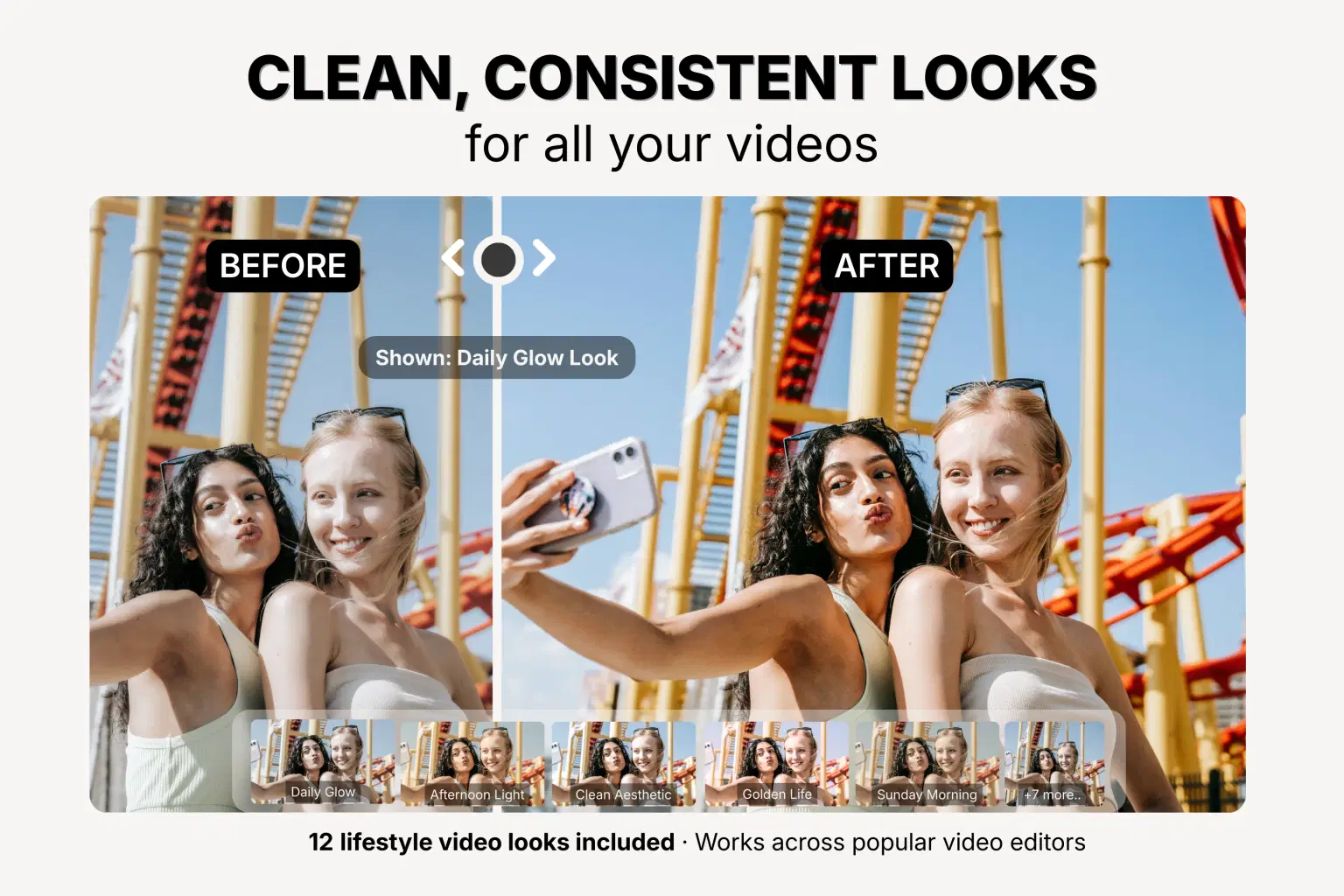
The ONETOUCH Lifestyle Pack gives you 12 professionally designed video looks that transform your everyday content with a single tap. No color grading knowledge required. No endless tweaking. Just instant, beautiful results.
Cozy and inviting. Clean and aspirational. Warm and authentic.
Your aesthetic, simplified.
What’s Included
12 Curated Video Looks
Look | Best For |
|---|---|
Cozy Home | Warm, inviting home content |
Sunday Morning | Soft, relaxed weekend vibes |
Clean Aesthetic | Minimalist, organized content |
Golden Life | Warm nostalgic, golden tones |
Soft & Dreamy | Ethereal, soft, dreamy quality |
Daily Glow | Everyday enhancement, subtle polish |
Warm Minimalist | Clean but cozy aesthetic |
Afternoon Light | Natural window light feel |
Cozy Evening | Warm, intimate nighttime content |
Morning Routine | Crisp, fresh start-of-day content |
Weekend Vibes | Fun, relaxed energy |
That Girl | Clean, aspirational lifestyle |
5 Adjustment Looks
Fine-tune your footage without guesswork:
Brighten +1 — Video is slightly too dark
Brighten +2 — Video is noticeably dark
Darken -1 — Video is slightly overexposed
Warm +1 — Add subtle warmth
Cool -1 — Reduce warmth, add cool tones
Complete Editor Guides
Step-by-step instructions for:
CapCut (iOS, Android, and Desktop)
Adobe Premiere Pro
DaVinci Resolve
Final Cut Pro
Perfect For
Day-in-my-life vlogs — Daily Glow, Clean Aesthetic
Morning routines — Morning Routine, That Girl
Home tours — Clean Aesthetic, Warm Minimalist
Cozy content — Cozy Home, Cozy Evening
Cleaning & organizing — Clean Aesthetic, That Girl
Weekend vlogs — Weekend Vibes, Sunday Morning
Evening routines — Cozy Evening, Soft & Dreamy
Self-care content — Soft & Dreamy, Golden Life
Why Creators Love It
One Consistent Aesthetic
Stop guessing. Pick your signature look and use it across all your content. Build a recognizable visual brand that your audience knows and loves.
Works With Your Phone
These looks are optimized for smartphone cameras — iPhone, Android, whatever you film with. No expensive camera required.
Edit Faster
Stop spending hours on color grading. Apply your look, make minor tweaks if needed, and move on. More time creating, less time editing.
No Technical Knowledge Required
If you can follow simple instructions, you can use these looks. Our guides walk you through everything in under 5 minutes.
How It Works
Download — Instant access after purchase
Import — Add to your video editor (we show you how)
Apply — One tap transforms your footage
Adjust — Fine-tune intensity if needed (we recommend 70-85%)
That’s it. Professional-looking video, every time.
Pro Tips
Natural light wins — Film near windows when possible; these looks enhance natural lighting beautifully
Match the mood — Cozy content = warm looks, clean content = minimal looks
Time of day matters — “Morning Routine” for AM content, “Cozy Evening” for PM
Build your signature — Pick 1-2 looks that become YOUR aesthetic
Compatibility
Video Editors:
CapCut (iOS, Android, Desktop)
Adobe Premiere Pro
DaVinci Resolve (Free and Studio)
Final Cut Pro
Any software that supports .cube files
Cameras:
iPhone (all models)
Android phones
Mirrorless and DSLR cameras
Webcams
GoPro and action cameras
Frequently Asked Questions
What exactly am I getting? You’re getting 12 professional video looks plus 5 adjustment looks, delivered as instant-download files. Apply them with a single tap in your video editor to transform your footage.
Do I need technical knowledge? Not at all. Our included guides walk you through everything step-by-step. Most people are up and running in under 5 minutes.
Will these work on my phone footage? Yes! These looks are specifically optimized for smartphone cameras where most lifestyle content is filmed.
Can I use these commercially? Yes. Your purchase includes a personal license to use these looks in your content, including monetized videos on YouTube, TikTok, Instagram, and any other platform.
What if a look is too strong? All video editors have an intensity slider. We recommend starting at 70-85% and adjusting from there.
What You Get
12 curated video looks for lifestyle content
5 adjustment looks for exposure and warmth
Step-by-step guides for all major editors
Instant digital download
Lifetime access
Lifetime access
One-time purchase, lifetime access
Ready to Elevate Your Content?
Stop settling for flat, inconsistent video. The ONETOUCH Lifestyle Pack gives you that warm, intentional aesthetic in seconds.
One touch. Your look.
ONETOUCH — Professional video looks for creators.
Shop confidently with Shuppi
If your download isn’t what was promised, we’ll make it right. Eligible purchases can be refunded within fourteen calendar days when listings mislead, files fail, or duplicate checkouts happen.
- Listings must match what you receive—no surprises.
- Corrupted files or technical issues? Request a quick fix or refund.
- Duplicate purchases are covered without the hassle.
Product Specs
Tags
Frequently Asked Questions
You May Also Like

Cute Capybara Stickers Prompt Pack
 Toptoria
Ultimate Elegant Cosmetic Label Template Pack

Pillow Base Mesh Asset Pack – High & Low Poly (4 Shapes + Paintkits)

Cemetery Asset Pack for Blender, UE5 and Unity
 ofy
ofy
Clear Packing Tape Texture

Premium 3D Letters & Numbers Icon Pack
Toptoria