









For personal, non-commercial projects only
About
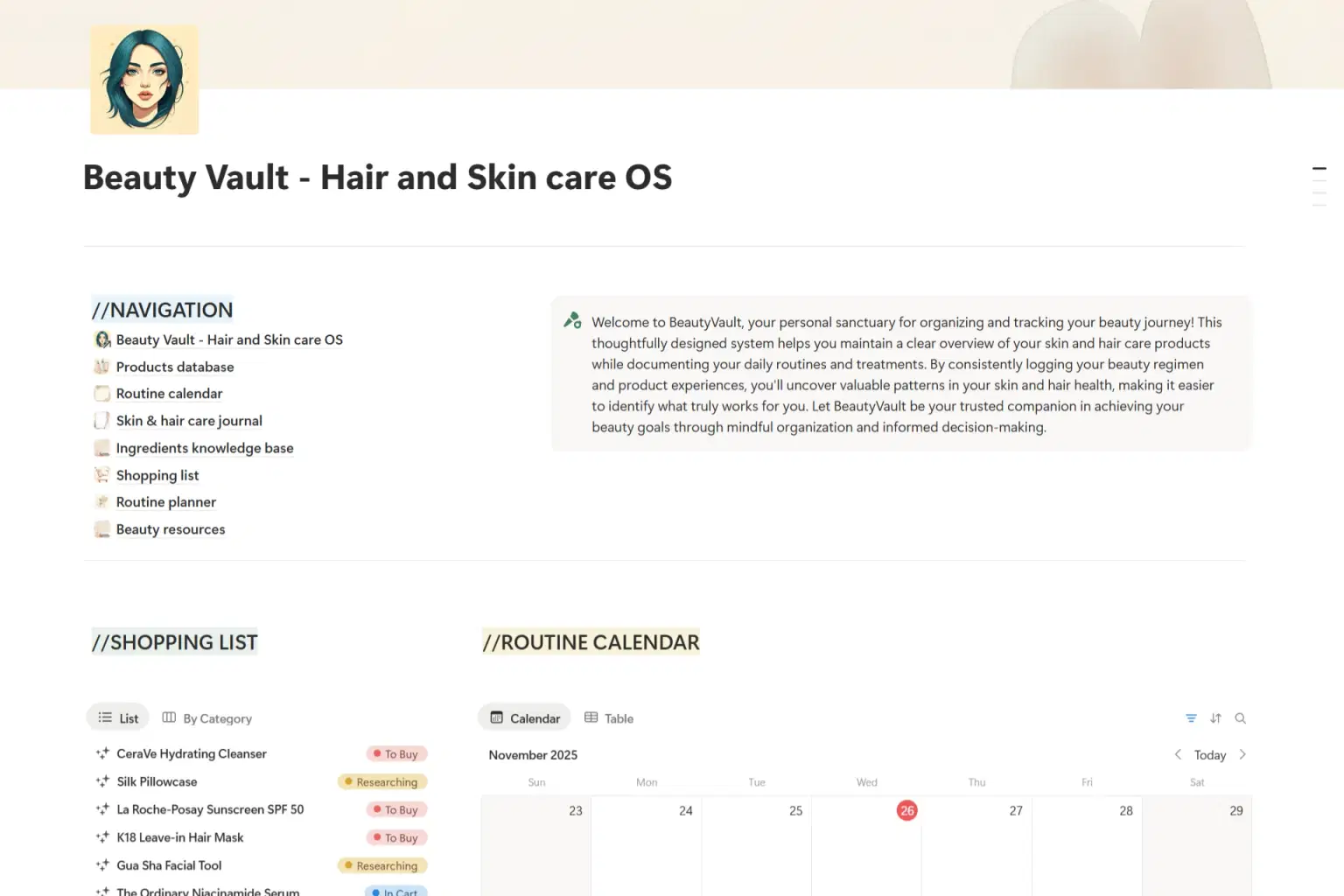
BeautyVault: Stop Guessing, Start Understanding
Let’s talk about that bottom shelf in your bathroom - the one cluttered with half-used serums and expensive creams that didn’t quite live up to the hype. We’ve all been there. It’s a graveyard of good intentions and wasted cash.
BeautyVault exists to bring some much-needed sanity to that chaos. Think of it not as a rigid spreadsheet, but as your personal beauty concierge living inside Notion. It turns the abstract concept of "self-care" into something tangible and manageable.
Instead of wondering why your skin is acting up or whether that new moisturizer is actually working, you’ll finally have the data. This system quietly tracks everything in the background - from expiration dates (so you stop using expired actives) to ingredient impact. It helps you connect the dots between what you buy, what you use, and how you actually look and feel.
Whether you’re a minimalist with three holy-grail items or a maximalist with a collection that rivals a department store, BeautyVault adapts to your pace. It’s time to stop hoarding and start curating. Treat your beauty regimen with the same intelligence you apply to the rest of your life.
Shop confidently with Shuppi
If your download isn’t what was promised, we’ll make it right. Eligible purchases can be refunded within fourteen calendar days when listings mislead, files fail, or duplicate checkouts happen.
- Listings must match what you receive—no surprises.
- Corrupted files or technical issues? Request a quick fix or refund.
- Duplicate purchases are covered without the hassle.
Product Specs
Tags
Frequently Asked Questions
You May Also Like

Career & Project Planner Hub - Notion Template for Career Planning and Project Management
 Plan it. Do it. Love it.
Skincare Tracker Notion Template
 Mohammed atia
Self-Care & Wellness Journal - Notion Template for Self-Care Journaling and Wellness Tracking
Plan it. Do it. Love it.
AI Project Manager Operating System
 Prompt Hub
Career Dashboard – Notion Template for Job Applications & Growth
 Letters to Somewhere
Beauty Retouch Pro FX – Photoshop Action
 studio retouch