















For personal, non-commercial projects only (portfolios, personal blogs, hobby projects).
About
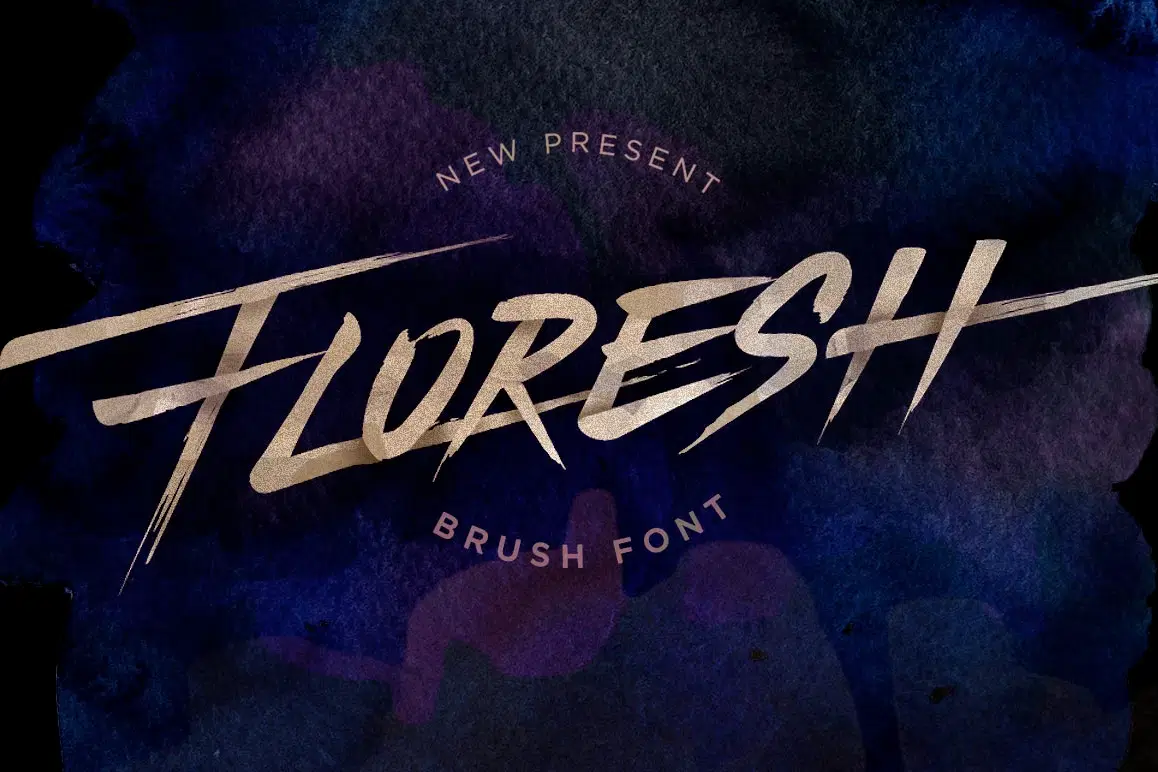
Floresh Typeface is hand brush typeface designed to help you create the look of stunning custom hand-lettering. Floresh Typeface comes with upper and lowercase characters, punctuation, numerals and OpenType features with Stylistic Alternates and ligatures.
Floresh Typeface is very best choice fonts for : Quotes, Posters, Logos, Print Ads, Digital Ads, Promotion Product, video bumper, etc.
Stylistic alternates characters are also available, accessible in the Adobe Illustrator Glyphs panel, or under Stylistic Alternates in the Adobe Photoshop OpenType menu.
Thanks
Shop confidently with Shuppi
If your download isn’t what was promised, we’ll make it right. Eligible purchases can be refunded within fourteen calendar days when listings mislead, files fail, or duplicate checkouts happen.
- Listings must match what you receive—no surprises.
- Corrupted files or technical issues? Request a quick fix or refund.
- Duplicate purchases are covered without the hassle.
Product Specs
Tags
Frequently Asked Questions
You May Also Like

TeeHand Upppercase Font
 akropol
Secy Break – Streetwear Fancy Display Font
 Black Junst
10,000 Font Mega Pack Bundle: Versatile Fonts for Designers (Digital Download)
 DiverseMediaShop
Procreate Pastel Brushes
 Elatedowl
33 Realistic Watercolor Procreate Brushes + 3 Canvases
Elatedowl
Abstract Texture Procreate Brushes
Elatedowl