
Home Cleaning & Maintenance System - Notion Template for Cleaning Schedule and Home Maintenance Tracker






For individual, private use only. Use the system to manage your own home cleaning and maintenance. Customize it to match your household routines.
About
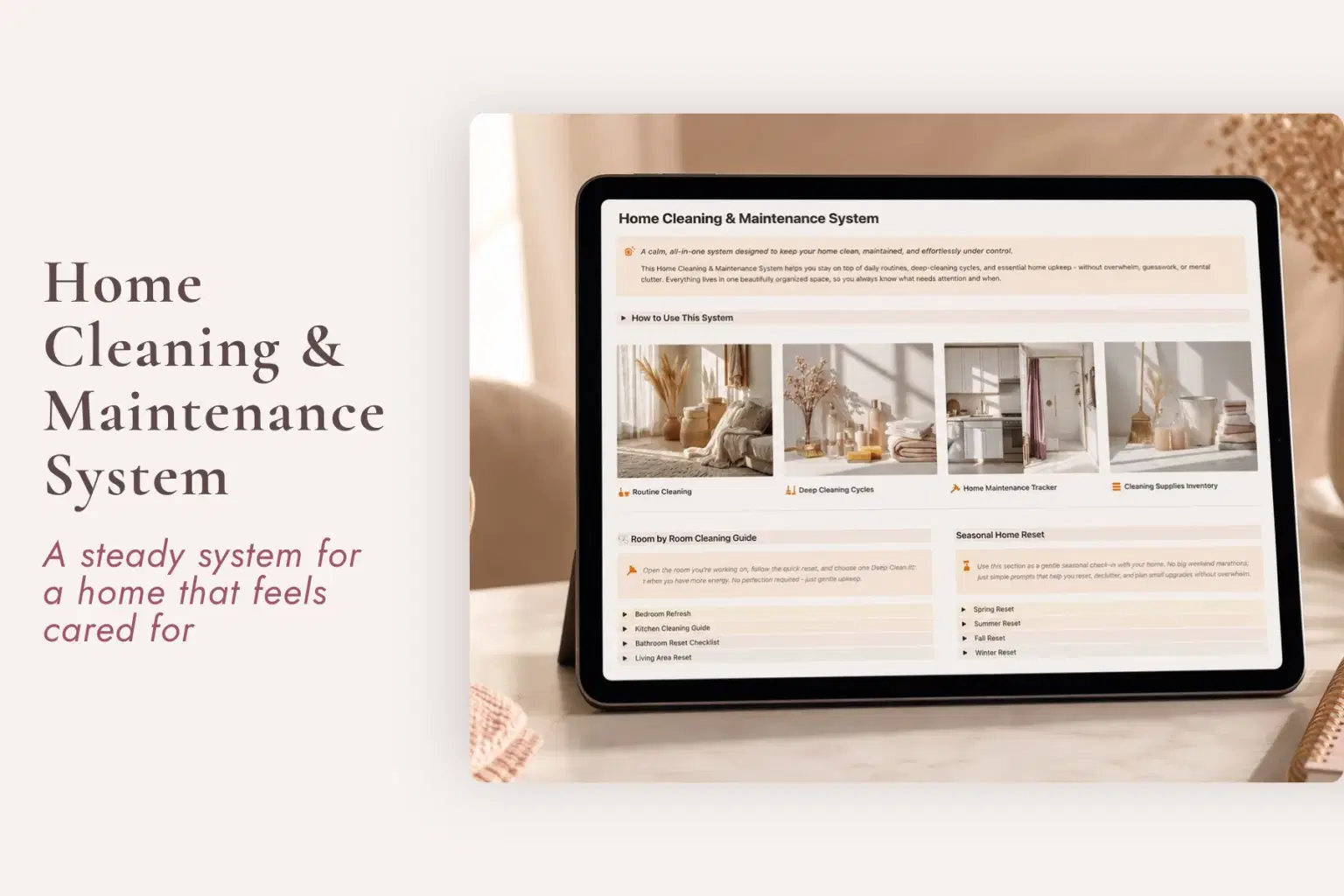
The Home Cleaning & Maintenance System is a Notion cleaning schedule and home maintenance tracker for women who are tired of mentally keeping track of what needs cleaning, what keeps coming back around, and which bigger home-care tasks they may be forgetting.
Instead of treating every household task like one endless unfinished list, this flexible Notion home-care system separates recurring cleaning, room-by-room resets, seasonal deep cleaning, and home maintenance into clear layers you can return to when you need them.
The goal is not a perfectly clean home. It is to give recurring household care somewhere dependable to live, so your head does not have to keep scanning the house for what needs attention next.
What the Home Cleaning & Maintenance System Helps You Manage
Routine Cleaning
Keep recurring cleaning tasks organized by room instead of rebuilding your cleaning list from memory every week.
Use Today’s Focus when you only need to see what deserves attention now, or return to the Weekly Overview for a broader view of the cleaning rhythm.
Room-by-Room Cleaning
Open the room you are working on and use a ready-made cleaning framework rather than deciding from scratch what should be done.
Each room can include:
Quick Daily Reset, approximately 5 to 10 minutes
Weekly Reset, approximately 15 to 20 minutes
Deep Clean Extras for more detailed care when time and capacity allow
The room guides are there as references, not rules you have to complete perfectly.
Seasonal Deep Cleaning
Keep larger cleaning jobs separate from everyday chores so they do not crowd your weekly list.
The seasonal system includes:
Seasonal Deep Cleaning Cycles
Seasonal cycle board
Coming Up view for the next 90 days
Editable timing so you can move, remove, or reschedule tasks for your actual home
This gives larger jobs a place across the year instead of waiting until they suddenly feel urgent.
Home Maintenance
Give recurring upkeep and household maintenance a dependable record so you do not have to keep remembering it at random.
The Home Maintenance Log can help you track recurring care such as:
Filter changes
Safety checks
Vent cleaning
Appliance care
Repairs or issues that need attention
Other maintenance tasks relevant to your home
Use the Upcoming Maintenance view to see what is coming rather than relying on the moment you happen to remember it again.
Four Layers of Home Care, Instead of One Endless List
Cleaning gets mentally heavy when everything is treated as if it belongs on the same schedule.
Wiping down a bathroom is not the same kind of task as deep-cleaning an appliance. A quick bedroom reset does not need to compete with seasonal cleaning. Replacing a filter should not have to live in your memory until the day you suddenly remember it again.
The Home Cleaning & Maintenance System separates home care into four practical layers:
Routine Cleaning
Room-by-Room Resets
Seasonal Deep Cleaning
Home Maintenance
That structure makes it easier to see what kind of home-care task something is, when it needs attention, and what can wait.
You Do Not Have to Keep Up Perfectly
This is not a cleaning challenge or a rigid household schedule.
You can:
Skip a day
Use only Today’s Focus
Open one room guide
Do a quick reset instead of the full weekly reset
Move a seasonal task
Remove cleaning tasks that do not apply
Change cleaning frequencies
Ignore a section until it becomes useful
Return to the system after a busy week without starting over
The schedule is a reference point, not another standard you are supposed to meet perfectly.
The system is there to remember the rhythm so you do not have to.
What’s Included
Keep Everyday Cleaning Visible
Home Cleaning & Maintenance dashboard
Routine Cleaning tracker by room
Today’s Focus view
Weekly Overview view
Reset a Room Without Rebuilding the List
Room-by-Room Cleaning Guide
Quick Daily Reset for each room
Weekly Reset for each room
Deep Clean Extras
Plan the Bigger Cleaning Cycles
Seasonal Deep Cleaning Cycles
Seasonal cycle board
Coming Up view for the next 90 days
Editable timing for your home
Remember Home Maintenance Once
Home Maintenance Log
Upcoming Maintenance view
Customizable maintenance tasks
Flexible setup for the care your space actually needs
Perfect For
Women looking for a Notion cleaning schedule
Working moms trying to keep up with recurring housework
Anyone searching for a weekly cleaning planner
People who want a Notion home maintenance tracker
Women who feel like housework is never truly finished
Anyone wanting a room-by-room cleaning system
Homeowners tracking recurring household maintenance
Renters who want to track home care, safety checks, repairs, and recurring upkeep
Anyone looking for a seasonal cleaning planner
People who want a digital cleaning checklist without one giant overwhelming chore list
Women who want household routines without productivity pressure
Notion users who want cleaning and maintenance organized in one home-care system
Important Details
Digital Notion template
$29 one-time purchase
No recurring template subscription
Instant digital access
Works with Notion’s free plan
Beginner friendly
Setup guidance included
Rooms can be renamed, added, or removed
Cleaning tasks and frequencies are customizable
Seasonal timing can be adjusted
Home maintenance tasks can be customized
Useful for both homeowners and renters
No physical product is included
Housework will come back around. Remembering all of it does not have to. Give recurring cleaning, seasonal care, and home maintenance somewhere dependable to live.
Shop confidently with Shuppi
If your download isn’t what was promised, we’ll make it right. Eligible purchases can be refunded within fourteen calendar days when listings mislead, files fail, or duplicate checkouts happen.
- Listings must match what you receive—no surprises.
- Corrupted files or technical issues? Request a quick fix or refund.
- Duplicate purchases are covered without the hassle.
Product Specs
Tags
Frequently Asked Questions
You May Also Like

The Whole Home, Held - Notion Template Bundle for Home and Family
Plan it. Do it. Love it.
Family & Household Command Center - Notion Template for Mental Load and Home Management
Plan it. Do it. Love it.
The Ultimate Notion Template Bundle: 20 Notion Templates for Life & Work
 Yanis’s Notion
The Meal Master System - Notion Template for Meal Planning and Digital Recipe Book
Plan it. Do it. Love it.
Bill Tracker in Notion
 The Notion Experience
the Kitchen | Meal Planner + Grocery System | Built with Notion
 Ordine Journals