


No credit card required
About
Never Miss a Bill Payment Again
Take complete control of your recurring bills with a beautifully organized tracking system built in Notion. The Bills Tracker gives you instant visibility over all your payment obligations, upcoming due dates, and payment history in one centralized workspace.
Whether you're managing household utilities, subscription services, insurance payments, or business expenses, this system brings clarity and peace of mind to your financial life. No more scrambling to remember which bills are due, checking multiple websites for payment information, or worrying about missed payments affecting your credit.
The Problem with Managing Bills
Most people struggle with bill management because payment information is scattered across multiple places. You might have some bills on auto-pay through your bank, others you pay manually through different websites, and a few that require mailing checks. Due dates don't align, and there's no single place to see your complete picture of recurring financial obligations.
This scattered approach leads to several frustrating problems. You might accidentally miss a payment because you forgot about it or confused the due date. You lose track of how much you're spending each month on recurring bills. You waste time logging into different websites to check payment amounts and due dates. And you feel anxious about whether you're staying on top of your financial obligations.
Traditional solutions like spreadsheets require constant manual updates and don't provide helpful views or reminders. Banking apps show you payments after they happen but don't help you plan ahead. Calendar reminders are better than nothing, but they don't give you the context you need to manage your bills effectively.
Your Complete Bills Management Solution
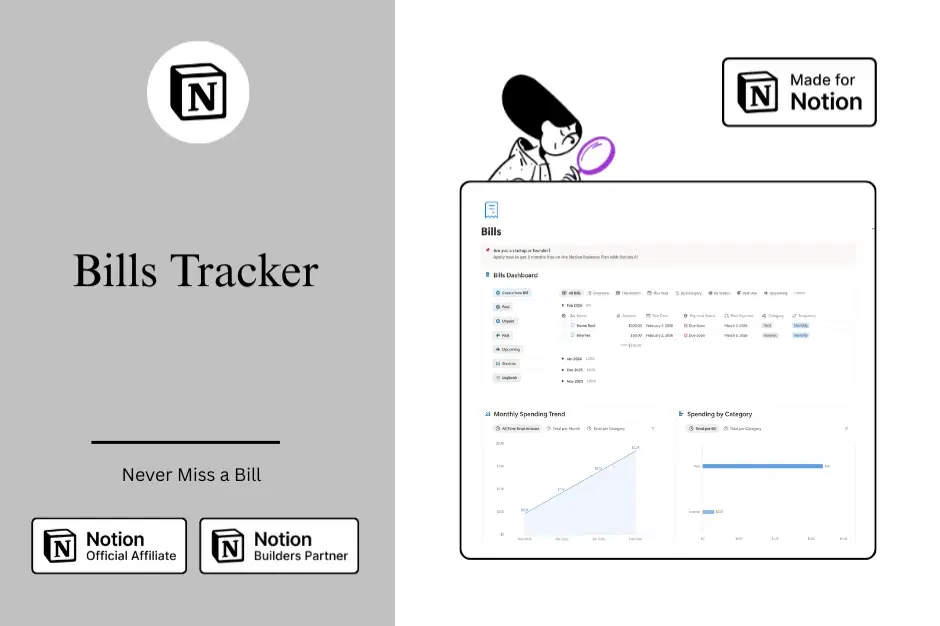
The Bills Tracker transforms bill management from a source of stress into a simple, organized process. This Notion template provides everything you need to track, monitor, and manage all your recurring bills in one beautiful workspace.
At the core of the system is a comprehensive database that stores all your bill information. Each bill entry includes the payment amount, due date, payment frequency, payment method, and current status. This centralized repository becomes your single source of truth for all bill-related information.
The system includes multiple specialized views that help you see your bills from different perspectives. The Unpaid view shows exactly which bills need your attention right now. The Upcoming view helps you plan ahead by showing bills that will be due soon. The Past view catches any bills that might have slipped through the cracks. And the Paid view serves as your payment history record.
Beyond these essential views, the system includes a Statistics view for analyzing your recurring expenses and identifying trends. The Logbook provides space for documenting payment confirmations, billing issues, or important notes about your bills over time.
Key Features
Centralized Bill Database
Store all your bill information in one organized database. Track bill names, amounts, due dates, payment frequencies, payment methods, and status. Add custom properties for account numbers, customer service contacts, or any other information you need to manage your bills effectively.
Multiple Specialized Views
See your bills from different perspectives with pre-built views designed for specific use cases. The Paid view shows your payment history. The Unpaid view displays bills requiring attention. The Past view identifies overdue payments. The Upcoming view helps you plan ahead. Each view is carefully filtered and sorted to show you exactly what you need to know.
Payment Status Tracking
Quickly mark bills as paid or unpaid and watch them automatically move to the appropriate views. This simple status toggle keeps your system accurate and gives you confidence that you're staying on top of your obligations.
Statistical Analysis
Understand your total recurring financial commitments with the Statistics view. See totals, averages, and patterns in your bills. Identify opportunities to reduce expenses by spotting subscriptions you no longer need or bills that have increased significantly.
Payment History Logbook
Document important information about your bill payments over time. Record confirmation numbers, note billing issues, track when you negotiated lower rates, or document changes to payment amounts. This historical record becomes valuable when you need to reference past payments or resolve billing disputes.
Flexible Customization
Adapt the system to match your specific needs. Add custom properties to track information unique to your situation. Create additional views with specific filters and sorts. Adjust the included views to display information in the format that works best for you.
Beautiful Design
Enjoy a clean, intuitive interface that makes bill management feel less like a chore. The system uses thoughtful organization, helpful icons, and clear visual hierarchy to help you quickly find the information you need.
Benefits You'll Experience
Peace of Mind
Know with confidence that all your bills are tracked and nothing will slip through the cracks. The anxiety about potentially missing a payment disappears when you have one reliable system showing you exactly what needs to be paid and when.
Time Savings
Stop wasting time logging into multiple websites to check due dates and payment amounts. All that information lives in one place where you can access it instantly. Your weekly bill review takes minutes instead of hours.
Better Financial Planning
See your total recurring financial commitments at a glance. This visibility helps you budget more effectively, plan for upcoming expenses, and ensure you have sufficient funds available when bills come due.
Improved Credit Score
Consistent on-time payments help build and maintain strong credit. When you have a reliable system reminding you of upcoming bills and making it easy to stay on top of payments, you naturally pay bills on time more consistently.
Reduced Financial Stress
Financial anxiety often comes from uncertainty. When you have complete visibility over your bill obligations and a system you trust to keep you on track, that stress melts away. You feel in control of your financial life instead of feeling like it's controlling you.
Smart Spending Decisions
The Statistics view helps you identify subscriptions and services you're paying for but not using. Many people discover they're spending hundreds of dollars each year on forgotten subscriptions. Cancelling just a few unnecessary services can lead to meaningful savings.
Better Organization
All your bill information lives in one organized workspace instead of being scattered across websites, emails, and paper statements. This organization makes it easy to find information when you need it, whether that's for tax purposes, budgeting, or resolving a billing issue.
Who This Is For
Individuals and Families
Manage household bills like utilities, insurance, subscriptions, and loan payments. Keep everyone in the household on the same page about financial obligations and due dates.
Small Business Owners
Track recurring business expenses like software subscriptions, service contracts, insurance policies, and vendor payments. Ensure timely payment of business obligations while maintaining clear records for accounting purposes.
Freelancers and Solopreneurs
Stay on top of both personal and business-related bills in one system. Easily separate personal from business expenses while maintaining visibility over all your financial obligations.
Budget-Conscious Individuals
Gain complete visibility over recurring expenses to make informed decisions about where your money goes each month. Identify opportunities to reduce spending and redirect those savings toward your financial goals.
Anyone Who's Missed a Bill Payment
If you've ever missed a payment because you forgot about it or confused the due date, this system is for you. The organized views and reminder capabilities ensure you always know what needs to be paid and when.
What You Get
When you get the Bills Tracker template, you receive the complete system ready to use immediately.
Recurring Bills Tracker Database: The central database with all essential properties pre-configured for tracking bill information.
Six Specialized Views: Paid, Unpaid, Past, Upcoming, Statistics, and Logbook views, each designed for specific bill management tasks.
Pre-Built Structure: The complete system architecture set up and ready to use. Simply duplicate the template and start adding your bills.
User Guide: Comprehensive documentation explaining how to use every component of the system, set up your first bills, and establish effective bill management routines.
Customization Flexibility: A system designed to adapt to your specific needs. Add properties, create views, and adjust filters to match your requirements.
Getting Started
Starting with the Bills Tracker is simple and straightforward.
Duplicate the template to your Notion workspace with a single click. The entire system copies over with all databases, views, and pages intact.
Add your first few bills to the Recurring Bills Tracker database. Start with your most important or frequently recurring bills. Enter the bill name, amount, due date, and payment status.
Explore the different views to understand how they organize your bill information. Check the Unpaid view to see bills requiring attention. Review the Upcoming view to plan for bills due soon. Look at the Statistics view to see your total recurring commitments.
Establish a weekly routine for reviewing your bills. Spend a few minutes each week checking upcoming bills, marking paid bills as complete, and ensuring nothing has been missed.
Gradually add more bills to the system until you have complete coverage of all your recurring financial obligations. As you add more bills, the system becomes increasingly valuable as your single source of truth for bill management.
Why Choose the Bills Tracker
The Bills Tracker stands out because it's specifically designed for bill management in Notion. This isn't a generic finance template or spreadsheet adapted for bills. Every component of the system was purposefully created to solve the specific challenges of tracking and managing recurring payments.
The system balances simplicity with functionality. It's easy enough for anyone to start using immediately, yet powerful enough to handle complex bill management scenarios. You don't need to be a Notion expert to use it effectively.
The Bills Tracker is built by someone who understands both Notion's capabilities and real-world bill management challenges. The system reflects best practices for personal financial organization while leveraging Notion's unique features like multiple database views and flexible properties.
Most importantly, this system actually works. It's not just visually appealing—though it is that too. The real value comes from how effectively it helps you stay on top of your financial obligations, reduce stress, and gain clarity over your recurring expenses.
Transform Your Bill Management Today
You don't have to continue struggling with scattered bill information, missed payments, and financial anxiety. The Bills Tracker gives you everything you need to take control of your recurring financial obligations in one beautifully organized Notion workspace.
Start managing your bills with confidence, clarity, and peace of mind.
— The Notion Experience
Contact: thenotionexperience@gmail.com
Shop confidently with Shuppi
If your download isn’t what was promised, we’ll make it right. Eligible purchases can be refunded within fourteen calendar days when listings mislead, files fail, or duplicate checkouts happen.
- Listings must match what you receive—no surprises.
- Corrupted files or technical issues? Request a quick fix or refund.
- Duplicate purchases are covered without the hassle.
Product Specs
Tags
Frequently Asked Questions
You May Also Like

Skincare Tracker Notion Template
 Mohammed atia
The Ultimate Notion Template Bundle: 20 Notion Templates for Life & Work
 Yanis’s Notion
Notion Habit Tracker & Daily Planner - Notion Template
Yanis’s Notion
Financial Freedom Planner Hub - Notion Template for Budget Planning and Personal Finance Tracker
 Plan it. Do it. Love it.
Notion Project and Task Tracker -Notion Template
Yanis’s Notion
Perimenopause Wellness Hub - Notion Template for Hormonal Health and Midlife Wellness
Plan it. Do it. Love it.