

No credit card required
About
What is Tasks Manager?
Tasks Manager is a comprehensive Notion template designed to help you take control of your to-do list and boost your productivity. Whether you're managing personal tasks, work projects, or everything in between, this system gives you the clarity and structure you need to stay on top of what matters most.
We built this template for anyone who feels overwhelmed by scattered tasks, struggles to prioritize what needs to get done, or simply wants a better way to organize their daily workflow. This isn't just another task list—it's a complete task management system that adapts to how you work.
Who is This For?
Tasks Manager is perfect for solopreneurs, small business owners, startup teams, productivity enthusiasts, and anyone looking to bring order to their daily work. If you've ever felt like tasks are slipping through the cracks, or you're constantly jumping between different apps and tools, this template brings everything together in one organized workspace.
You might be someone who loves the flexibility of Notion but doesn't want to spend hours building a task system from scratch. Or maybe you've tried other task managers but found them too rigid or complicated. Tasks Manager gives you the best of both worlds—structure that works right out of the box, with the flexibility to customize it as your needs evolve.
What's Included?
When you duplicate Tasks Manager, you get access to a fully built task management system with multiple views and pages designed to support different workflows.
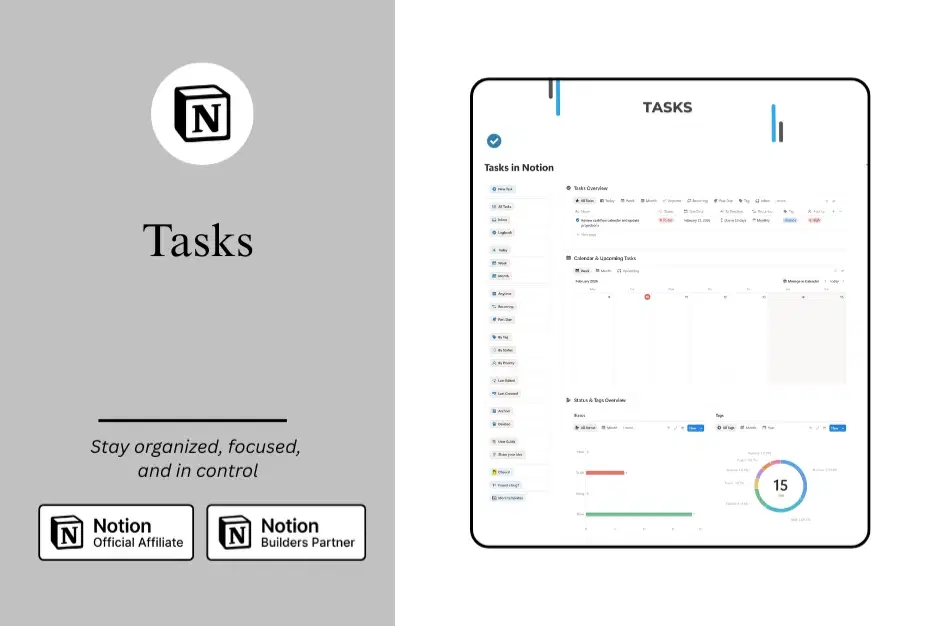
The template includes a central Tasks database that powers the entire system. From there, you can view your tasks in multiple ways depending on what you need to see. The Inbox view gives you a landing place for new tasks before you process them. The Today, Week, and Month views help you focus on what's coming up in your timeline. Status, Priority, and Tag views let you organize and filter tasks based on how you categorize your work.
We've also included specialized views like Past Due for catching tasks that need attention, Recurring for tasks that repeat on a schedule, Logbook for completed tasks, and Archive for tasks you want to keep but remove from your active views. Every view is designed with a specific purpose so you can find exactly what you need when you need it.
How Does It Work?
Tasks Manager uses Notion's database system to give you multiple perspectives on the same information. When you add a task, it lives in one central database, but you can view and interact with it through any of the included views.
You can assign dates to tasks, set priority levels, add tags for categorization, and track status from Todo through In Progress to Done. The calendar view lets you see tasks plotted across time, while the board views group tasks visually by status or tags.
The system is designed to be intuitive from day one. You don't need to be a Notion expert to use it effectively. Simply start adding your tasks, choose the views that match your workflow, and begin checking things off your list.
Why Choose Tasks Manager?
We created Tasks Manager because we believe task management should be simple, flexible, and beautiful. You shouldn't have to choose between a system that looks good and one that actually works. This template gives you both.
Unlike rigid task management apps, Tasks Manager adapts to your workflow rather than forcing you into a predetermined structure. Want to view tasks by project? By urgency? By the time of day you plan to tackle them? You can customize views to match exactly how you think about your work.
The template saves you hours of setup time while giving you a professional system that would take days to build from scratch. Every database property, every view, every filter has been thoughtfully designed based on real-world task management needs.
Getting Started
Once you duplicate the template, you can start using it immediately. Add your first few tasks to get a feel for how the system works. Explore the different views to see which ones resonate with your workflow. Customize properties, filters, and layouts as you discover what works best for you.
The beauty of Tasks Manager is that it grows with you. Start simple with just a few views, then expand as you get more comfortable. The system is built to scale from managing a handful of personal tasks to coordinating complex projects with multiple priorities.
Template Details
What You Get:
Complete Tasks database with all essential properties
15+ pre-built views for different workflows
Dashboard with overview of tasks by status and tags
Calendar view for timeline planning
Help center with guidance on using the system
Perfect For:
Daily task management
Project planning and tracking
Priority management
Deadline tracking
Personal and professional organization
Template Version: 2.0
Last Updated: February 2026
Shop confidently with Shuppi
If your download isn’t what was promised, we’ll make it right. Eligible purchases can be refunded within fourteen calendar days when listings mislead, files fail, or duplicate checkouts happen.
- Listings must match what you receive—no surprises.
- Corrupted files or technical issues? Request a quick fix or refund.
- Duplicate purchases are covered without the hassle.
Product Specs
Tags
Frequently Asked Questions
You May Also Like

Notion Project and Task Tracker -Notion Template
 Yanis’s Notion
The Ultimate Notion Template Bundle: 20 Notion Templates for Life & Work
Yanis’s Notion
Career & Project Planner Hub - Notion Template for Career Planning and Project Management
 Plan it. Do it. Love it.
StickyFlow Board - Notion Template
Yanis’s Notion
RoutineOS – All-in-One Notion System for Creating Tasks and Routines
 Notion Harbour
Home Cleaning & Maintenance System - Notion Template for Cleaning Schedule and Home Maintenance Tracker
Plan it. Do it. Love it.