
TextureForge Pro – The Ultimate Texture Lab & Creative Image Editor for Windows




Single developer, one project or website
About
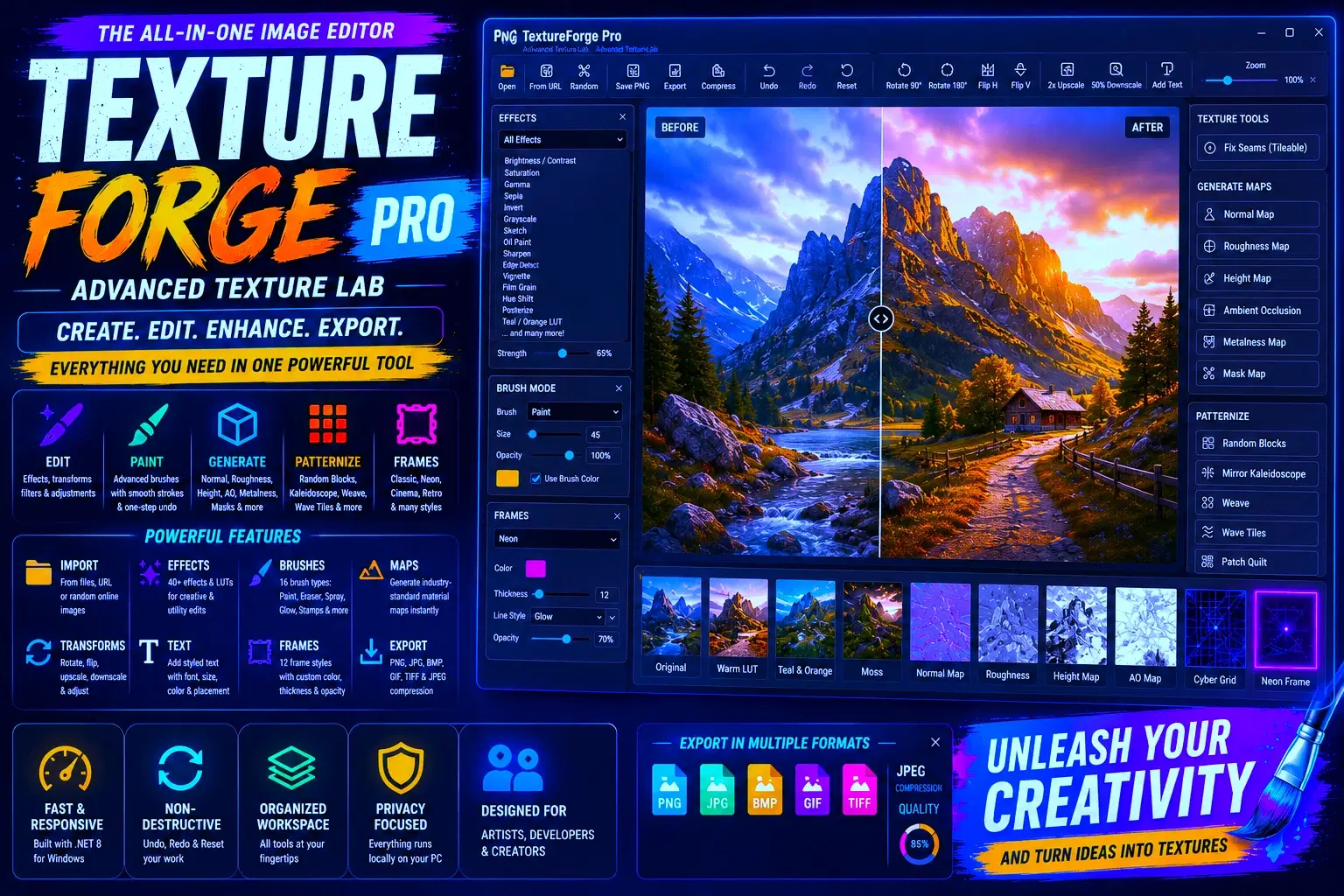
TextureForge Pro turns your photos and textures into stunning, game-ready assets in just a few clicks – no complex software needed. Load any image, then instantly apply stylised filters, generate material maps, paint with artistic brushes, add professional frames, or transform the image into kaleidoscopic patterns. Whether you're a game developer, digital artist, designer, or hobbyist, TextureForge Pro gives you a lightning-fast creative playground right on your desktop.
What makes TextureForge Pro special
Load images from anywhere – open local files, paste a URL, or fetch a random online image to start experimenting.
Export in all popular formats – save as PNG, JPG, BMP, GIF, or TIFF, with adjustable JPEG compression.
One-click material maps – create normal, roughness, height, AO, metalness, and mask maps from any image. Perfect for game engines and 3D workflows.
Fix tiling instantly – the seam-fixing tool turns any picture into a seamless repeatable texture.
Over 25 live effects with a strength slider – go from subtle corrections to dramatic stylisations: brightness, contrast, sepia, oil paint, charcoal, bloom, film grain, vignette, chromatic aberration, teal/orange look, horror, desert, and many more.
17 artistic brushes – paint, erase, spray, sparkle, snowflake, star, soft glow, checker, diamond, emboss dot, cloud, hex stamp, thread, and others. Change brush size and opacity, and paint directly on the zoomable preview.
Professional frames & borders – apply Classic, Film, Neon, Gold, Cinema Black, Cyber Grid, Frosted, Retro Card, Corner Brackets, and more. Customise line thickness, colour, and opacity to match your style.
Pattern generation magic – turn your image into Random Blocks, Mirror Kaleidoscope, Weave, Wave Tiles, or Patch Quilt layouts with a single click.
Text tool – add stylish captions with any font, size, colour, and placement.
Full undo/redo – experiment fearlessly. Every action can be rolled back.
Fast and lightweight – native Windows app, no cloud uploads, no subscriptions. All processing happens on your machine.
Who is it for?
Game devs who need quick texture variants, map generation, and seamless tiling.
Digital artists exploring stylised looks and filter combinations.
Designers creating patterned backgrounds or framed assets for social media.
Modders and 3D enthusiasts preparing PBR material maps.
Anyone who wants a compact, creative image tool without the bloat of giant suites.
System Requirements – Windows 10 or later, .NET 8 runtime (free from Microsoft). Simply install and launch.
Perfect for quick iteration – start with moderate-sized images for the fastest results, then scale up when you’re happy.
Get TextureForge Pro today and turn ordinary images into extraordinary textures in minutes.
Shop confidently with Shuppi
If your download isn’t what was promised, we’ll make it right. Eligible purchases can be refunded within fourteen calendar days when listings mislead, files fail, or duplicate checkouts happen.
- Listings must match what you receive—no surprises.
- Corrupted files or technical issues? Request a quick fix or refund.
- Duplicate purchases are covered without the hassle.
Product Specs
Tags
Frequently Asked Questions
You May Also Like

AI Project Manager Operating System
 Prompt Hub
Career & Project Planner Hub - Notion Template for Career Planning and Project Management
 Plan it. Do it. Love it.
Premium Academic Life OS: All-in-One Planner, Finance, Habits & Lifestyle Tracker | Dark Academia Edition | Complete Productivity System
 The Scriptorium
TextureForge Pro – Full C# Source Code | .NET 8 Windows Forms Image & Texture Editor Lab
DiverseMediaShop
Abstract Texture Procreate Brushes
 Elatedowl
50 ChatGPT Prompts for E-commerce | Product Descriptions, Ads, Emails & More
 Prompt Bees