
TextureForge Pro – Full C# Source Code | .NET 8 Windows Forms Image & Texture Editor Lab




Single developer, one project or website
About
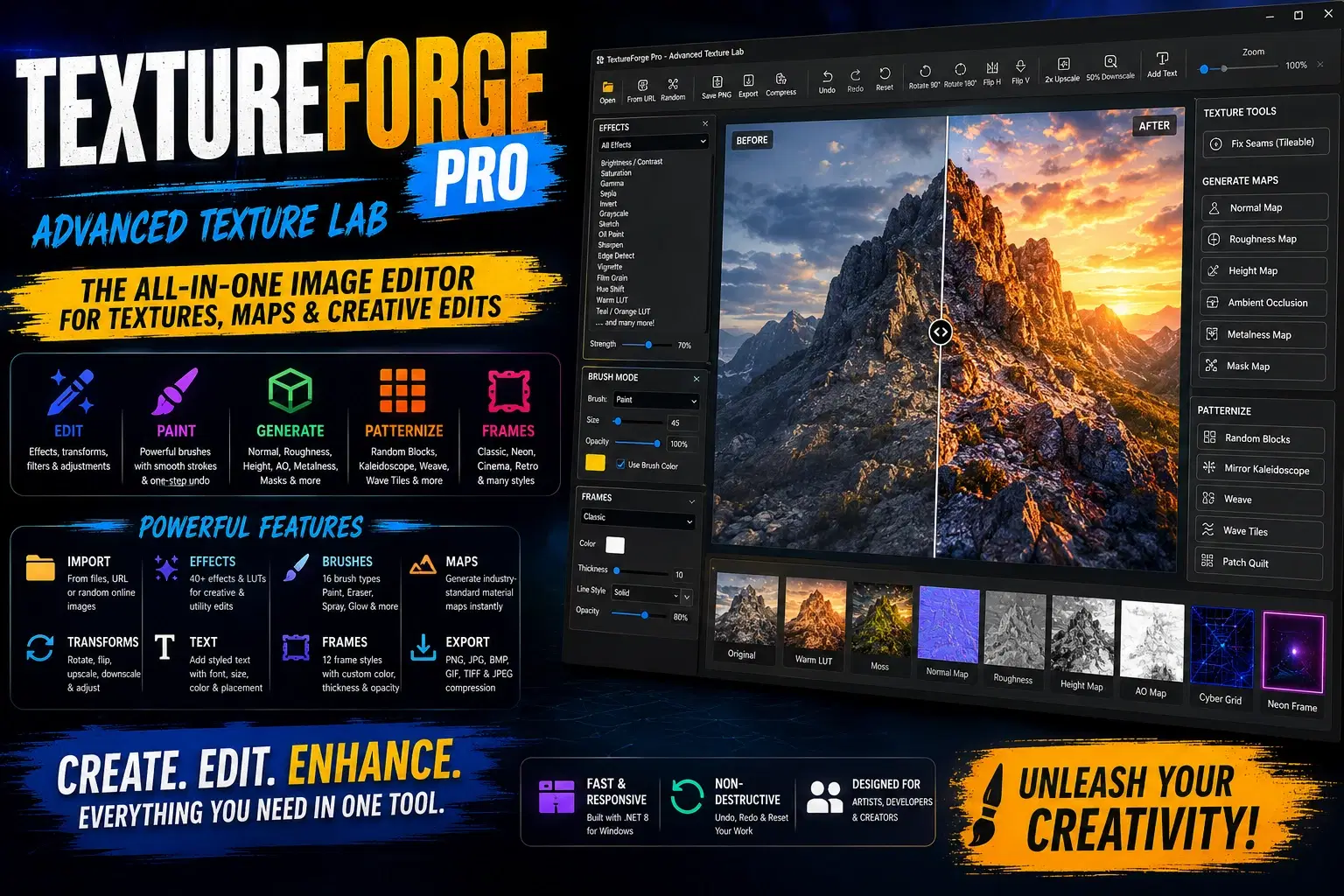
Own the complete, ready-to-build source of a professional-grade texture and image editing desktop app. TextureForge Pro is a cleanly structured .NET 8 Windows Forms solution that packs over 50 image operations, a full effects pipeline, a multi-brush painting system, material-map generation, and frame/stylisation tools – all in a single, self-contained project. Perfect for learning, extending, or rebranding.
What you’ll get inside
Full Visual Studio solution (
TextureEditor.sln+TextureEditor.csproj) targeting .NET 8 Windows Forms.Production-ready image engine – load from file, URL, or random online source; save/export to PNG, JPG, BMP, GIF, TIFF with quality control.
Undo/redo stack with efficient brush-history management (one undo per stroke).
25+ image effects with strength slider: from basic corrections (brightness, contrast, gamma) to stylised filters (oil paint, charcoal, cartoon, emboss, Sobel, vignette, film grain, chromatic aberration, LUT-style looks, and more).
Material-map generator – create normal, roughness, height, ambient occlusion, metalness, and mask maps from any image.
Tileability helper – fix seams to produce seamless repeating textures.
Brush system – 17 brush types (paint, eraser, spray, sparkle, snowflake, crosshatch, cloud, hex stamp, etc.) with configurable size and opacity, all rendered in a zoomable preview.
Frame designer – 12 frame styles (Classic, Film, Neon, Cyber Grid, Frosted, Retro Card, etc.) with adjustable thickness, color, opacity, and line style.
Patternization engine – transform images into Random Blocks, Mirror Kaleidoscope, Weave, Wave Tiles, and Patch Quilt layouts.
Text overlay with font, size, placement, and color control.
Complete painting and zoom interaction on the preview canvas.
Clear, self-contained code – no external dependencies beyond the .NET framework.
Why this source is valuable
Learn by example – see how a real, feature-rich Windows Forms app handles image processing, undo/redo, brush painting, filter graphs, and UI state.
Extend instantly – add your own effects, brushes, or map types using the existing extensible architecture.
Ship your own product – rebrand, customise the interface, and release your own texture lab without starting from scratch.
Game-dev tooling foundation – integrate directly with your asset pipeline, or use the code as a reference for building material-authoring utilities.
Requirements – Windows OS, .NET 8 SDK, Visual Studio 2022 or compatible IDE. Build and run with a single dotnet run.
Licensing – [Insert your license terms here, e.g., royalty-free for commercial use, etc.]
Shop confidently with Shuppi
If your download isn’t what was promised, we’ll make it right. Eligible purchases can be refunded within fourteen calendar days when listings mislead, files fail, or duplicate checkouts happen.
- Listings must match what you receive—no surprises.
- Corrupted files or technical issues? Request a quick fix or refund.
- Duplicate purchases are covered without the hassle.
Product Specs
Tags
Frequently Asked Questions
You May Also Like

AI Project Manager Operating System
 Prompt Hub
Career & Project Planner Hub - Notion Template for Career Planning and Project Management
 Plan it. Do it. Love it.
Premium Academic Life OS: All-in-One Planner, Finance, Habits & Lifestyle Tracker | Dark Academia Edition | Complete Productivity System
 The Scriptorium
Coding Base Pro
 Systema templates by Heiba
50 ChatGPT Prompts for E-commerce | Product Descriptions, Ads, Emails & More
 Prompt Bees
**CodeGuard™ Suite: Professional Code Analysis for Security, Performance & Infrastructure**
 Monna AI