







For personal, non-commercial projects only
About
Whether you are a beginner stepping into the gym for the first time, a bodybuilder perfecting a PPL (Push/Pull/Legs) split, or a powerlifter tracking heavy PRs, the Workout Tracker is designed to adapt to your exact training style.
This all-in-one Notion dashboard replaces clunky fitness apps and messy spreadsheets. It gives you a seamless, automated system to log your sessions, visualize your data, and stay consistent. By automatically pulling up your past performance and personal bests, it takes the guesswork out of progressive overload so you can focus on lifting heavier and getting stronger. Complete with focus timers, embedded music, and a full video setup guide, this template gives you everything you need to crush your fitness goals in one workspace.
What’s Included:
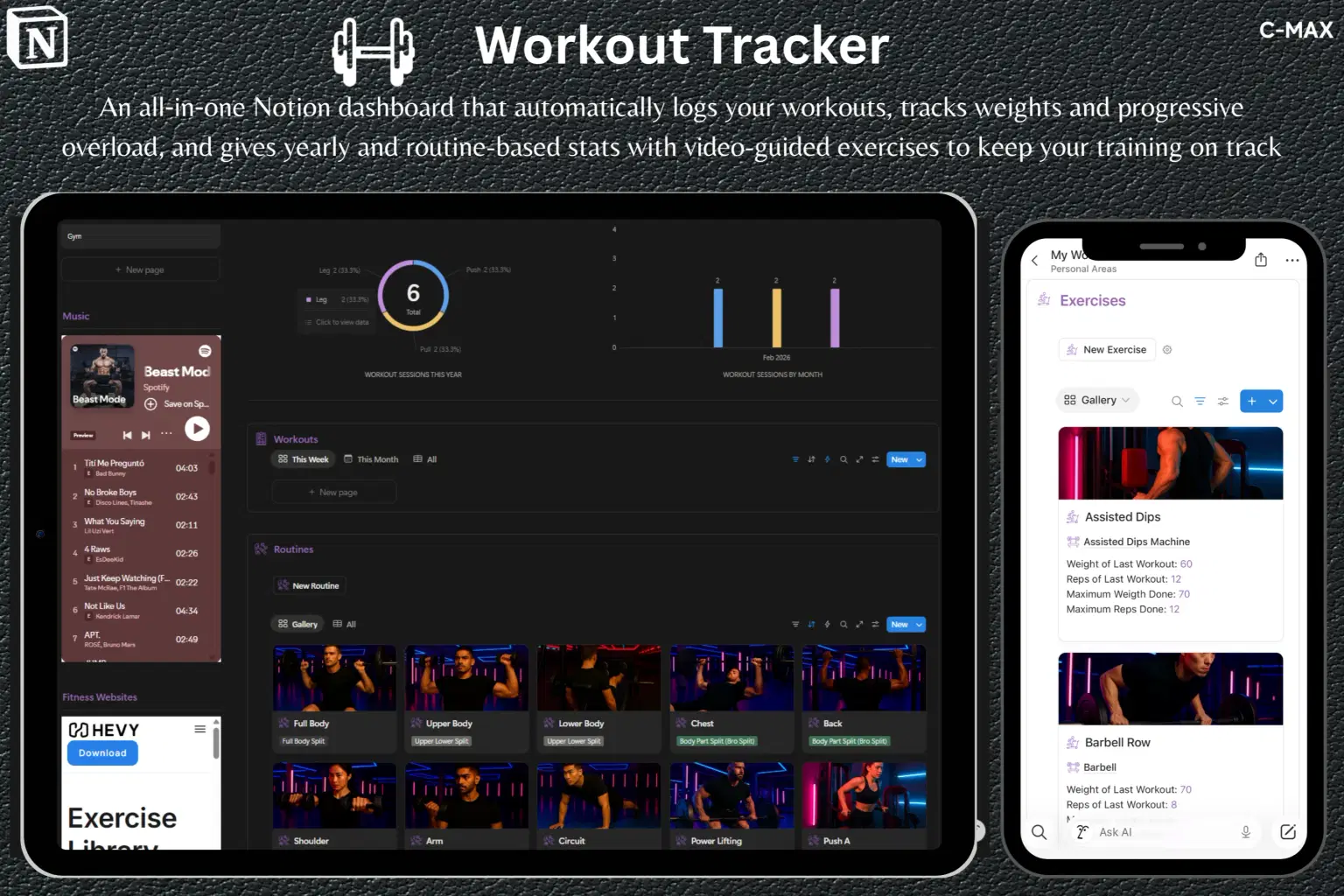
Smart Workout Logging: Create a new workout session with a single button press and easily log all your sets.
Built-in Progressive Overload: Automatically displays your last workout's reps and weight, plus your all-time max reps and weight for every single exercise.
Exercise Video Library: Includes video descriptions and demonstrations for each exercise to help you perfect your form.
Advanced Analytics: Track your total workout sessions per year, your monthly consistency/completion rate, and get a breakdown of stats based on your specific routines.
Body Weight & Goal Tracking: Log your current body weight and visually track your progress toward your target goal.
Fully Customizable: Easily add your own routines, splits, and exercises to match however you like to train.
Focus & Flow: Stay in the zone with embedded workout music and a built-in Pomodoro-style timer for your rest periods.
Complete Fitness Hub: A dedicated space to manage fitness-related tasks, projects, notes, and resources, complete with embedded fitness websites for quick reference.
Step-by-Step Setup Guide: Includes a full video guide showing you exactly how to set up, use, and customize the template in minutes.
Shop confidently with Shuppi
If your download isn’t what was promised, we’ll make it right. Eligible purchases can be refunded within fourteen calendar days when listings mislead, files fail, or duplicate checkouts happen.
- Listings must match what you receive—no surprises.
- Corrupted files or technical issues? Request a quick fix or refund.
- Duplicate purchases are covered without the hassle.
Product Specs
Tags
Frequently Asked Questions
You May Also Like

Skincare Tracker Notion Template
 Mohammed atia
The Ultimate Notion Template Bundle: 20 Notion Templates for Life & Work
 Yanis’s Notion
Health & Fitness Hub - Notion Template for Fitness Tracking and Healthy Habits for Women
 Plan it. Do it. Love it.
Notion Habit Tracker & Daily Planner - Notion Template
Yanis’s Notion
Financial Freedom Planner Hub - Notion Template for Budget Planning and Personal Finance Tracker
Plan it. Do it. Love it.
fitness & workout tracker notion template
 jddesignonline