










For personal, non-commercial projects only
About
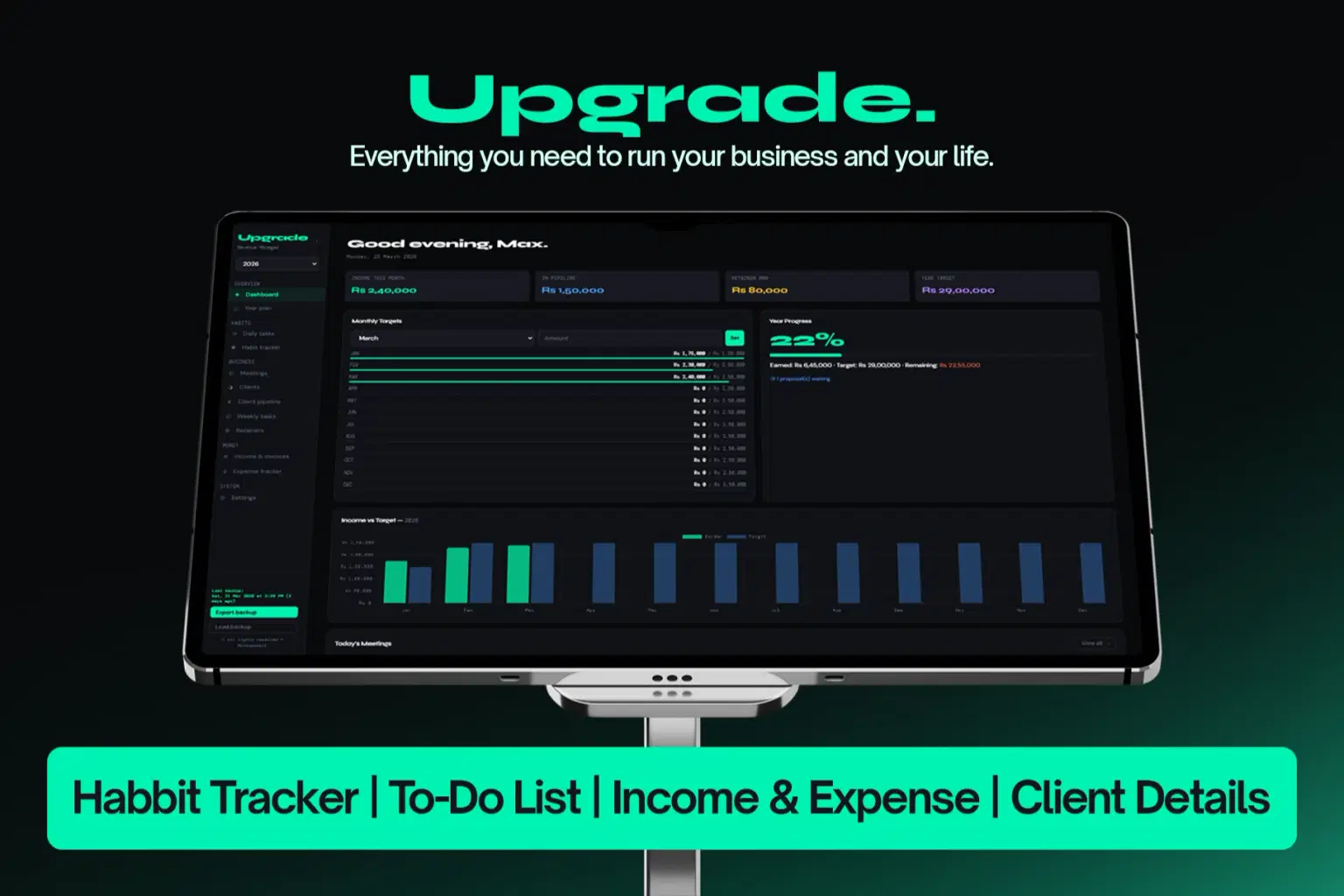
Upgrade — Your Business OS. Your Life OS.
Stop juggling multiple tools that don’t work together.
Upgrade brings everything into one place. Your clients, income, tasks, planning, habits, and daily work all inside a simple app you fully control.
Open it, log in once, and you’re set. After that, everything works smoothly even without internet. Your data stays private, stored on your device, always yours.
WHAT’S INSIDE
Dashboard
Your entire business at a glance. Track income, expenses, profit, active clients, and monthly targets. See today’s schedule instantly so nothing slips.
Year Plan
Plan your entire year with clarity. Break goals into months and weeks, track progress, and keep notes so you always know where you're heading.
Daily Tasks
Your daily execution system. Capture ideas instantly, manage priorities, and track your progress. Tasks stay until they’re done.
Calendar
A clean visual calendar for your work and life. Schedule events, track status, and always know what’s coming today and tomorrow.
Work Timeline
See your workflow clearly. Plan and track tasks across days with progress indicators so you know what’s moving forward.
System
Your daily activity tracker. Log tasks, track completion, and see exactly how productive your day has been.
Client Pipeline
Your sales flow, simplified. Track leads from first contact to closed deals and always know what’s in progress.
Clients
Your complete client management system. Store details, track status, and manage relationships without losing context.
Retainers
Track recurring income easily. See your monthly revenue and manage predictable income streams.
Income
Log every payment clearly. Track what’s received, what’s pending, and monitor growth over time.
Expenses
Understand where your money goes. Track spending and see your real profit, not just revenue.
Habit Tracker
Build consistency. Track habits daily or weekly and stay aligned with your personal growth.
Resources
Save useful links, tools, and references in one place so you never lose them again.
Settings
Stay in control. Export your data anytime and keep everything safe.
WHY FREELANCERS LOVE IT
One system replaces multiple tools
Works offline after you start using it
Your data stays on your device, completely private
No subscriptions, pay once and use forever
Works on desktop and mobile
Backup anytime with one click
Lifetime updates included
Can be installed like an app
PERFECT FOR
Freelancers, Designers, Developers, Consultants, Creators, Solopreneurs, Anyone running a one-person business
SUPPORT
Questions?
hello@mockupshelf.com — every message is personally answered
Shop confidently with Shuppi
If your download isn’t what was promised, we’ll make it right. Eligible purchases can be refunded within fourteen calendar days when listings mislead, files fail, or duplicate checkouts happen.
- Listings must match what you receive—no surprises.
- Corrupted files or technical issues? Request a quick fix or refund.
- Duplicate purchases are covered without the hassle.
Product Specs
Tags
Frequently Asked Questions
You May Also Like

One-Click Lifestyle Looks Pack
 OneClick Looks
Premium Academic Life OS: All-in-One Planner, Finance, Habits & Lifestyle Tracker | Dark Academia Edition | Complete Productivity System
 The Scriptorium
Lifestyle Master Hub - Notion Template for Daily Life Planning and Weekly Organization
 Plan it. Do it. Love it.
Vanilla Girl Student Dashboard | All-in-One Notion Template for Study, Life & Wellness
 Fleura Co
Real One / Streamer Essential
 HONEYDOG
Perimenopause Wellness Hub - Notion Template for Hormonal Health and Midlife Wellness
Plan it. Do it. Love it.