












Personal, non-commercial projects
About
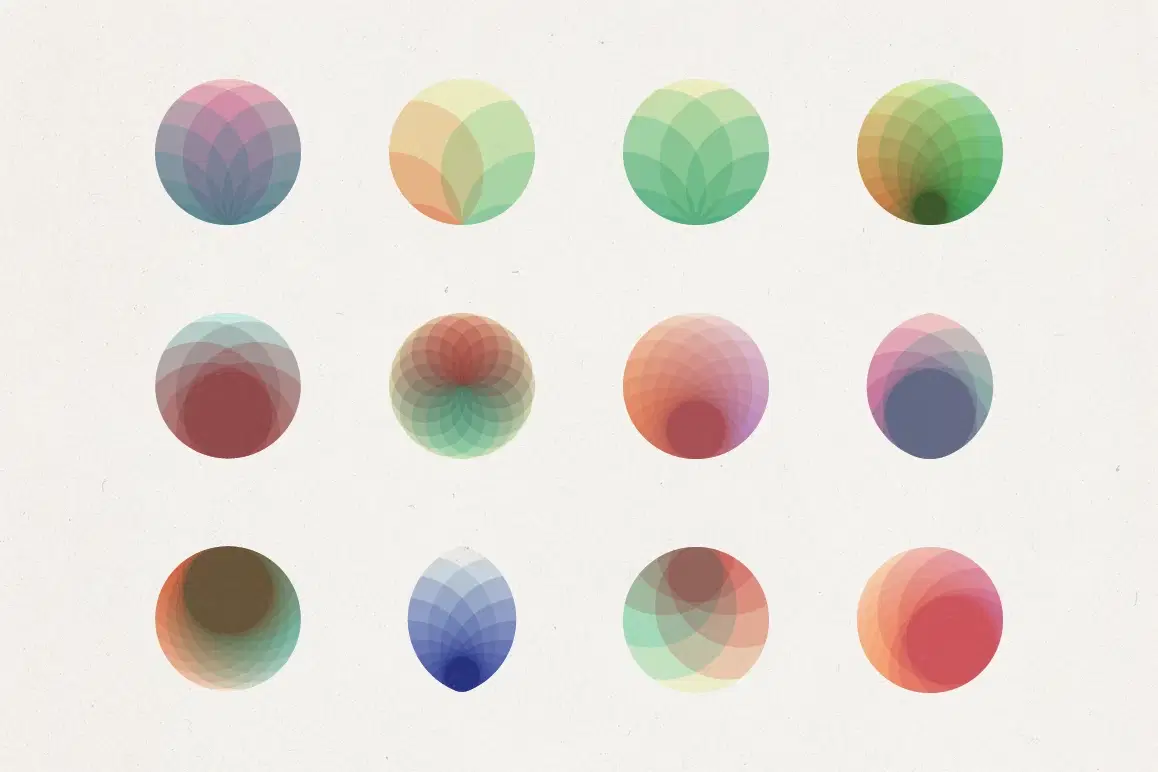
A collection of geometric circular compositions built from overlapping translucent shapes. Each design uses layered arcs, petals, and curved segments that intersect to create depth through transparency and color mixing.
Color palettes range from soft pastels and monochromatic tones to vibrant multi-color combinations. The neutral and metallic versions work well for professional contexts, while saturated options suit more expressive projects. Where elements overlap, new colors emerge through blending, creating subtle gradients and dimensional effects.
These work as standalone graphics, logo elements, icons, decorative accents, or layered texture elements. They scale cleanly and maintain clarity whether used small (app icons, UI elements) or large (posters, backgrounds). Particularly suited for branding work, editorial illustrations, presentation graphics, or web design elements.
Each logo comes in 4 color themes and monoline. 60 x 5 = 300 logo's
- illustrator CC
- 300 SVG's
- 300 PNG's (5000 x 5000px)
Shop confidently with Shuppi
If your download isn’t what was promised, we’ll make it right. Eligible purchases can be refunded within fourteen calendar days when listings mislead, files fail, or duplicate checkouts happen.
- Listings must match what you receive—no surprises.
- Corrupted files or technical issues? Request a quick fix or refund.
- Duplicate purchases are covered without the hassle.
Product Specs
Tags
Frequently Asked Questions
You May Also Like

Spectrum Glow Abstract Background

CIRCLES & SPHERES - 100 Icons/logos
 KLOROFORM
Circle Particle Animation Videos: Overlays, Transitions, Effects - Digital Download
 DiverseMediaShop
ORGANIC CIRCLES - 120 Radial Objects
KLOROFORM
NEBULA - 12 Elements + 24 Backgrounds
KLOROFORM
GRADIAL - 200 Gradients / 170 AI Color Groups / 270 PS Gradient Maps
KLOROFORM