
Dungeon RPG Monsters Evolutions - Stylized Low Poly Animated Enemies























Personal learning, hobby projects, non-commercial renders
About
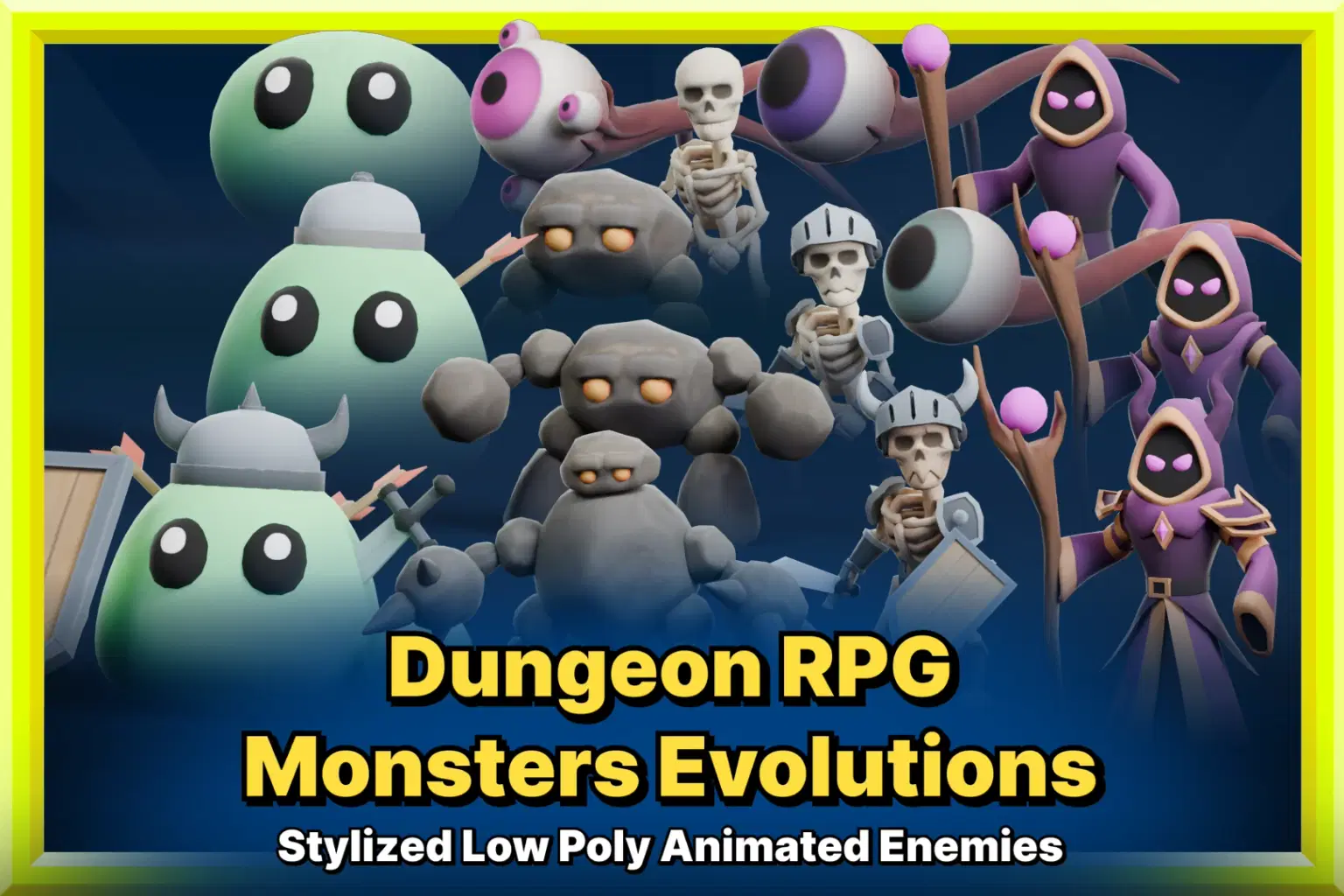
Pack of 5 stylized low poly RPG monsters with 3 evolutions each (15 unique variants in total). Fully animated and game-ready. Perfect for dungeon crawlers, roguelikes, and fantasy RPGs.
Dungeon RPG Monsters Evolutions – Stylized Low Poly Animated Enemies
Bring your games to life with this pack of stylized, low poly animated monsters. Perfect for fantasy projects, RPGs, roguelikes and dungeon crawlers, this pack provides a variety of enemies ready to use into your game.
🎮 Features:
5 different enemy types
3 evolutions per monster (15 unique variants in total)
Fully animated
Stylized look for optimized performance
Game-ready models with clean topology and UVs
Animations included (customised for each type of enemy):
- Spawn
- Idle
- Walk
- Attack
- Charged attack
- Take damage
- Death
All variations of the same enemy share the same amature and animations.
🚀 Compatible with Unity and Unreal Engine and optimized for performance.
Made with: Blender
Tested on:
Unity 2021.3.22f1 (URP)
Unreal Engine 5.2
If you like this pack, don’t forget to leave a review. Your feedback helps improve future assets!
Technical details
Number of textures: 15
Texture dimensions: 1024 x 1024px
Polygon count of Slime1: 576
Polygon count of Slime2: 1163
Polygon count of Slime3: 1966
Polygon count of Golem1: 974
Polygon count of Golem2: 1772
Polygon count of Golem3: 2690
Polygon count of Skeleton1: 2360
Polygon count of Skeleton2: 2996
Polygon count of Skeleton3: 3398
Polygon count of DarkWizard1: 1296
Polygon count of DarkWizard2: 1751
Polygon count of DarkWizard3: 2277
Polygon count of FloatingEye1: 537
Polygon count of FloatingEye2: 881
Polygon count of FloatingEye3: 1867
Minimum polygon count: 537
Maximum polygon count: 3398
Number of meshes/prefabs: 20
Rigging: Yes
Animation count: 40
Animation type list:
- Slime: spawn, idle, walk, attack, charged attack, take damage, death
- Golem: spawn, sleep pose, awake, idle, walk, attack, charged attack, take damage, death
- Skeleton: spawn, idle, walk, attack, charged attack, take damage, death
- Dark Wizard: spawn, idle, walk, attack, charged attack, take damage, death
- Floating Eye: spawn, idle, walk, attack, laser attack, laser attack (start), laser attack (loop), laser attack (finish), take damage, death
UV mapping: Yes
LOD information: No LODs
Types of materials and texture maps: Base color
Shop confidently with Shuppi
If your download isn’t what was promised, we’ll make it right. Eligible purchases can be refunded within fourteen calendar days when listings mislead, files fail, or duplicate checkouts happen.
- Listings must match what you receive—no surprises.
- Corrupted files or technical issues? Request a quick fix or refund.
- Duplicate purchases are covered without the hassle.
Product Specs
Frequently Asked Questions
You May Also Like

Perilous Dungeon / RPG Essential
 HONEYDOG
82 Pixel-Art Emoji Face Pack - Stylized Pixelated Cute Face Emotion Icons | Simple, Fun, Stylized, Pixelized - Instant Digital Download
 DiverseMediaShop
28 Pixel-Art Emoji Face Pack - Stylized Pixelated Cute Face Emotion Icons | Simple, Fun, Stylized, Pixelized - Instant Digital Download
DiverseMediaShop
30 Emoji Face Pack - Stylized Cute Face Emotion Icons | Simple, Fun, Stylized, Detailed - Digital Product | Instant Download
DiverseMediaShop
Shadow Horde / Epic RPG Essential
HONEYDOG
Windows XP Background Art Bundle: 19 Stylized Wallpapers (Digital Download)
DiverseMediaShop