Desktop - Personal
For personal, non-commercial projects only (portfolios, personal blogs, hobby projects).
SSL Secured Stripe Powered Buyer Protection
About
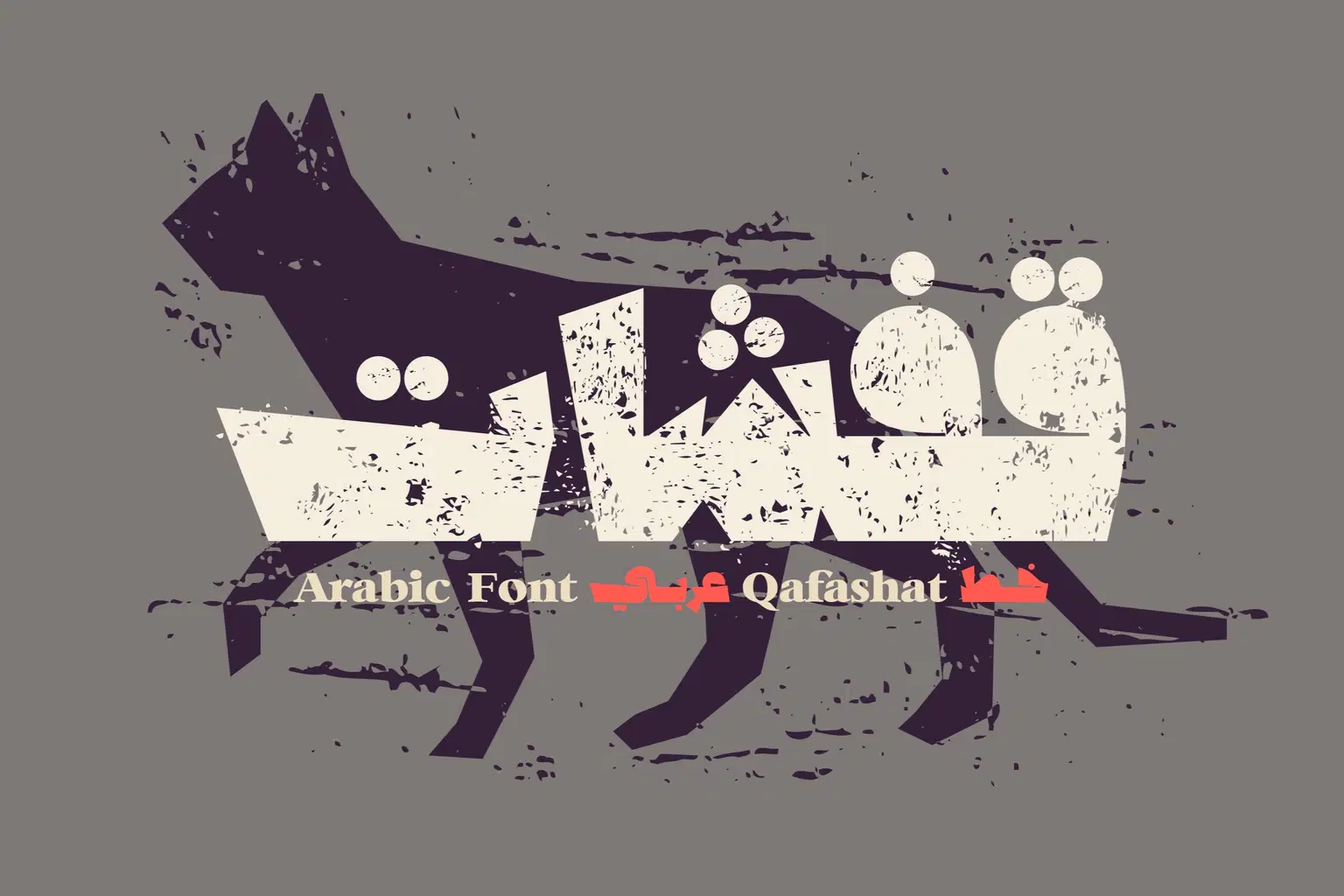
Qafashat (which is the Arabic word for 'quips') is an Arabic display font that features witty, heavy and grungy letterform style. The font design simulates to some extend the effect of woodcut printmaking. Qafashat is suitable for modern design projects including print, web and mobile applications.
Trustpilot
TrustScore4.4
14-Day Refund Promise
Shop confidently with Shuppi
If your download isn’t what was promised, we’ll make it right. Eligible purchases can be refunded within fourteen calendar days when listings mislead, files fail, or duplicate checkouts happen.
- Listings must match what you receive—no surprises.
- Corrupted files or technical issues? Request a quick fix or refund.
- Duplicate purchases are covered without the hassle.
SSL Secured Stripe Powered Buyer Protection
Product Specs
File Format(s)
OTF
Glyphs
280+ Characters
Compatible With
Windows, Mac and Mobile Applications
Styles Included
Two styles
Download Size
2.11 MB
Created
Dec 4, 2025
Version Number
1.0
Tags
arabic fontarabic typefacearabic typographyarabic logoarabicfontsخط عربيخطوط عربيةarabic calligraphyarabic fonts