











Personal use only
About
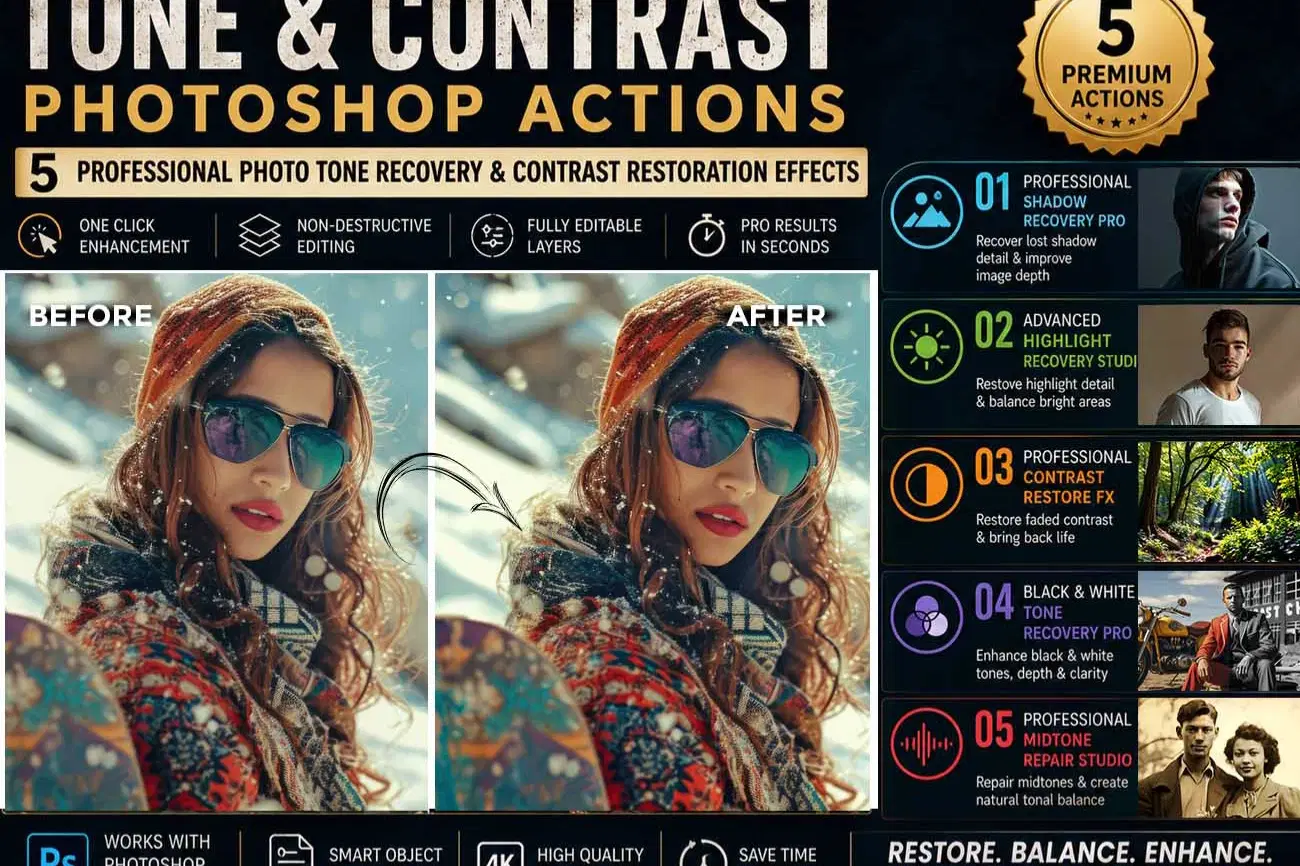
Tone & Contrast Photoshop Actions – 5 Professional Photo Tone Recovery & Contrast Restoration Effects
Restore the depth, balance, and natural tonal range of your photographs with the Tone & Contrast Photoshop Actions collection. This professional bundle includes five carefully crafted Photoshop Actions designed to recover shadow detail, repair blown highlights, rebuild faded contrast, improve black & white tonal balance, and restore rich midtones for a clean, professional finish.
Unlike ordinary one-click filters, these actions use a guided, non-destructive restoration workflow. Each action automatically prepares your image with organized, editable adjustment layers and applies professional tonal corrections while preserving complete editing flexibility.
Every action is designed to improve image quality naturally without producing harsh or overprocessed results, making this collection ideal for photographers, designers, restorers, and content creators.
Included Actions
Professional Shadow Recovery Pro
Recover hidden shadow detail while preserving natural contrast and image depth.
Advanced Highlight Recovery Studio
Restore bright areas, recover highlight detail, and reduce overexposed regions for balanced exposure.
Professional Contrast Restore FX
Bring life back to flat, low-contrast photographs by restoring tonal separation and dynamic range.
Black & White Tone Recovery Pro
Improve grayscale photographs with deeper blacks, cleaner whites, smoother tonal transitions, and enhanced contrast.
Professional Midtone Repair Studio
Restore midtone balance, improve tonal transitions, and create a more natural-looking photograph.
Professional Guided Workflow
Each action creates a fully organized and editable layer structure for professional tonal restoration.
When manual adjustment is beneficial, a clear Stop Message appears with easy on-screen instructions. Simply follow the guidance, make any optional edits if desired, and press Play to allow the action to complete the remaining enhancement automatically.
This workflow gives beginners confidence while providing professionals with complete creative control through fully editable adjustment layers.
Features
• 5 Professional Tone Restoration Photoshop Actions
• Contrast Recovery Workflow
• Shadow & Highlight Restoration
• Midtone Optimization
• Black & White Tonal Enhancement
• Smart Object Compatible
• Fully Editable Layers
• Non-Destructive Editing
• Organized Layer Groups
• High Resolution Support
• Beginner Friendly
• Professional Photo Restoration Workflow
Perfect For
• Old Family Photographs
• Vintage Prints
• Portrait Photography
• Wedding Photography
• Travel Photography
• Landscape Photography
• Film Scans
• Historical Archives
• Studio Photography
• Professional Photo Editing
Compatibility
Compatible with Adobe Photoshop CC 2020, CC 2021, CC 2022, CC 2023, CC 2024, CC 2025, and newer versions.
Why You'll Love This Collection
Restore natural image depth, improve tonal balance, and recover beautiful contrast with a professional workflow designed for both beginners and experienced Photoshop users. Every action is fully editable, non-destructive, and built to save time while delivering consistent, high-quality results.
File Includes:
- ATN File included (Photoshop Action File)
- Help File
- High quality result.
- Easy Customizable
- Organize layers
- Easy Install
- Easy to Use
- No photoshop skill needed
If you need any cooperation using the file please feel free to contact me:
"The model images and photographs are for presentation purposes and not included for sale"
Tone Restoration Photoshop Action, Contrast Restore Photoshop Action, Shadow Recovery Photoshop Action, Highlight Recovery Photoshop Action, Midtone Repair Photoshop Action, Black White Recovery Photoshop Action, Photo Tone Correction, Dynamic Range Photoshop Action, Exposure Correction Photoshop Action, Professional Photoshop Actions, Photo Restoration Photoshop Action, Vintage Photo Restoration, Image Contrast Enhancement, Shadow Detail Recovery, Highlight Detail Recovery, Grayscale Enhancement, Smart Object Photoshop Action, Non Destructive Photoshop Action, Photoshop Editing Workflow, Professional Photo Editing, Portrait Enhancement Photoshop Action, Film Scan Restoration, Old Photo Restoration, Photoshop Action Bundle, Tonal Balance Photoshop, Contrast Enhancement, Photo Editing Effects, Photography Workflow
#ToneRestoration, #ContrastRestore, #ShadowRecovery, #HighlightRecovery, #MidtoneRepair, #PhotoRestoration, #PhotoshopActions, #PhotoshopBundle, #PhotoEditing, #GraphicDesign, #PhotographyTools, #ImageEnhancement, #VintagePhoto, #FilmRestoration, #ProfessionalEditing, #ContentCreator, #PhotoshopExpert, #DigitalEditing
Shop confidently with Shuppi
If your download isn’t what was promised, we’ll make it right. Eligible purchases can be refunded within fourteen calendar days when listings mislead, files fail, or duplicate checkouts happen.
- Listings must match what you receive—no surprises.
- Corrupted files or technical issues? Request a quick fix or refund.
- Duplicate purchases are covered without the hassle.
Product Specs
Tags
Frequently Asked Questions
You May Also Like

RGB Prism Explosion FX — Photoshop Action
 studio retouch
17 Viral Editing Effects Photoshop Action Bundle
studio retouch
RGB Echo Chamber FX Photoshop Action
studio retouch
RGB Portrait Fracture FX Photoshop Action
studio retouch
16-in-1 Photoshop Actions Mega Bundle
studio retouch
SCRATCHBOARD INK ENGRAVING FX — Photoshop Action
studio retouch