











Personal use only
About
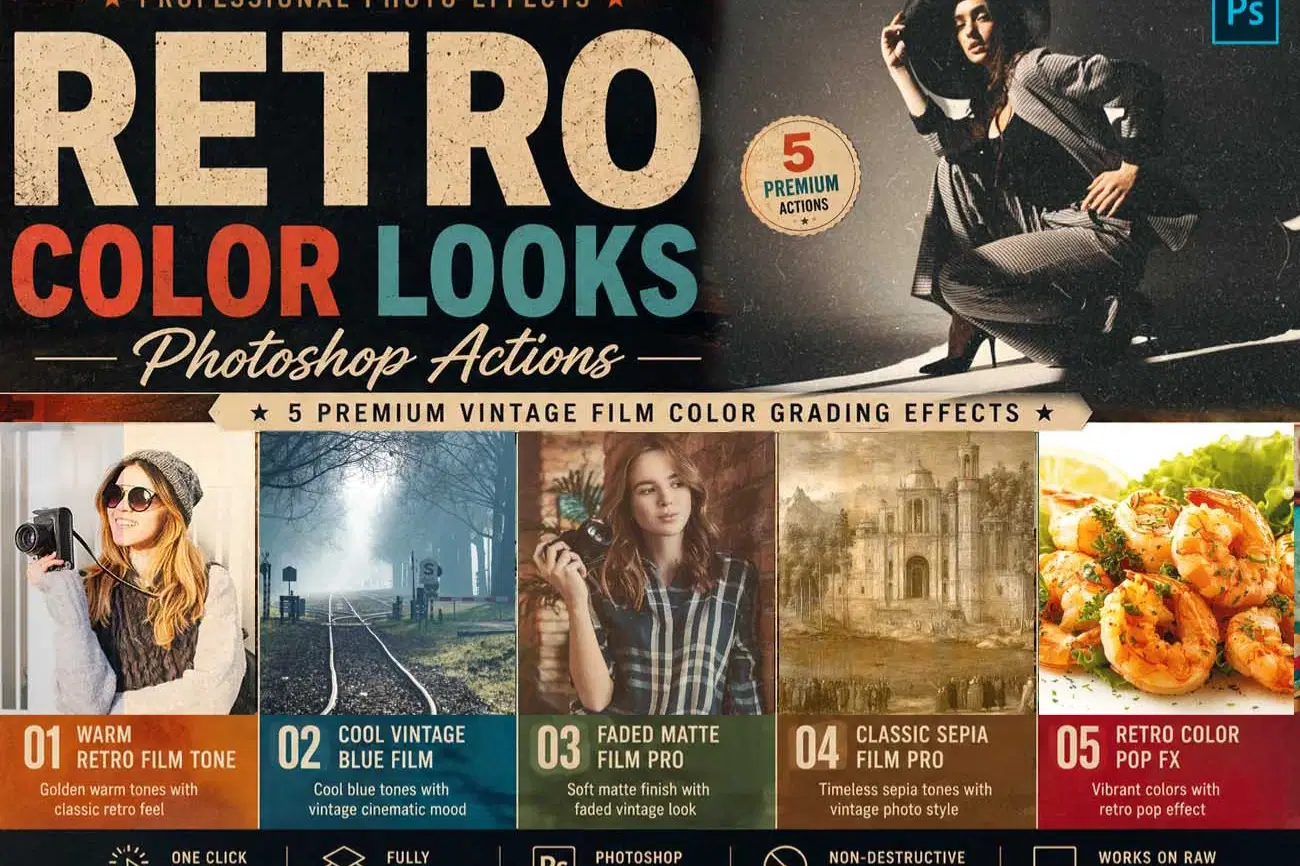
Retro Color Looks Photoshop Actions – 5 Premium Vintage Film Color Grading Effects
Give your photos a timeless retro aesthetic with Retro Color Looks Photoshop Actions, a premium collection of five professionally crafted Photoshop Actions inspired by classic film photography, vintage color grading, and nostalgic analog tones. Designed for photographers, designers, content creators, and digital artists, this bundle instantly transforms modern digital images into beautiful retro masterpieces with just one click.
Whether you're creating cinematic portraits, lifestyle photography, travel images, fashion editorials, wedding albums, street photography, or creative social media content, these Photoshop Actions deliver authentic vintage-inspired colors while preserving natural details and professional image quality.
Each action has been carefully optimized with a fully editable, non-destructive workflow, allowing you to customize every effect to match your own creative style. From warm nostalgic tones and cool vintage blues to soft matte finishes, classic sepia colors, and vibrant retro-inspired color grading, this collection provides everything you need to achieve professional retro photo effects in seconds.
Included Photoshop Actions
✔ Warm Retro Film Tone
✔ Cool Vintage Blue Film
✔ Faded Matte Film Pro
✔ Classic Sepia Film Pro
✔ Retro Color Pop FX
Features
• 5 Premium Photoshop Actions
• Authentic Retro & Vintage Color Grading
• Professional Analog Film Looks
• One-Click Photo Enhancement
• Fully Editable Layers
• Non-Destructive Workflow
• Smart Object Compatible
• High Resolution (300 DPI) Support
• Well-Organized Layer Structure
• Easy Customization
• Fast Professional Results
• Beginner-Friendly & Expert Approved
Perfect For
• Portrait Photography
• Wedding Photography
• Travel Photography
• Lifestyle Photography
• Fashion Photography
• Street Photography
• Nature Photography
• Editorial Projects
• Branding & Marketing
• Instagram & Social Media Content
• Digital Art
• Creative Portfolio Presentation
Compatible with Adobe Photoshop CS6, CC 2020, CC 2021, CC 2022, CC 2023, CC 2024, CC 2025, and newer versions.
Bring the timeless beauty of vintage film photography into your creative workflow with rich retro colors, authentic analog-inspired grading, soft matte tones, elegant sepia styling, vibrant color pop, and professional cinematic finishing—all in a single click.
File Includes:
- ATN File included (Photoshop Action File)
- Pattern File
- PDF Help File
- Help File
- High quality result.
- Easy Customizable
- Organize layers
- Easy Install
- Easy to Use
- No photoshop skill needed
If you need any cooperation using the file please feel free to contact me:
"The model images and photographs are for presentation purposes and not included for sale"
Retro Color Photoshop Action, Vintage Color Grading, Retro Film Photoshop Action, Matte Film Effect, Faded Film Photoshop Action, Sepia Film Effect, Vintage Blue Color Grading, Warm Retro Tone, Retro Color Pop, Analog Film Color, Retro Photography Effect, Vintage Photo Effect, Film Color Grading Photoshop Action, Cinematic Color Grading, Vintage Film Look, Analog Photography Effect, Retro Editing Photoshop Action, Photoshop Action Bundle, Smart Object Photoshop Action, Editable Photoshop Action, High Resolution Photoshop Action, Professional Photo Effects, Vintage Color Effects, Retro Color Grading, Analog Color Tone, Matte Photography Effect, Sepia Photography Effect, Retro Film Look
#RetroColor, #VintageColor, #FilmColorGrading, #MatteFilm, #SepiaEffect, #RetroPhotography, #VintageFilm, #AnalogFilm, #ColorPop, #PhotoshopAction, #PhotoshopActions, #PhotoEditing, #GraphicDesign, #DigitalArt, #VintagePhotography, #RetroStyle, #FilmLook, #CreativeAssets, #DesignResources, #ColorGrading, #ProfessionalEditing, #PhotoEffects
Shop confidently with Shuppi
If your download isn’t what was promised, we’ll make it right. Eligible purchases can be refunded within fourteen calendar days when listings mislead, files fail, or duplicate checkouts happen.
- Listings must match what you receive—no surprises.
- Corrupted files or technical issues? Request a quick fix or refund.
- Duplicate purchases are covered without the hassle.
Product Specs
Tags
Frequently Asked Questions
You May Also Like

RGB Prism Explosion FX — Photoshop Action
 studio retouch
17 Viral Editing Effects Photoshop Action Bundle
studio retouch
RGB Portrait Fracture FX Photoshop Action
studio retouch
RGB Echo Chamber FX Photoshop Action
studio retouch
Film Grainy Color Pro Photoshop Action
studio retouch
Triple Halftone Stamp Art Photoshop Action
studio retouch