












Personal use only
About
Banknote Engraving FX — Photoshop Action
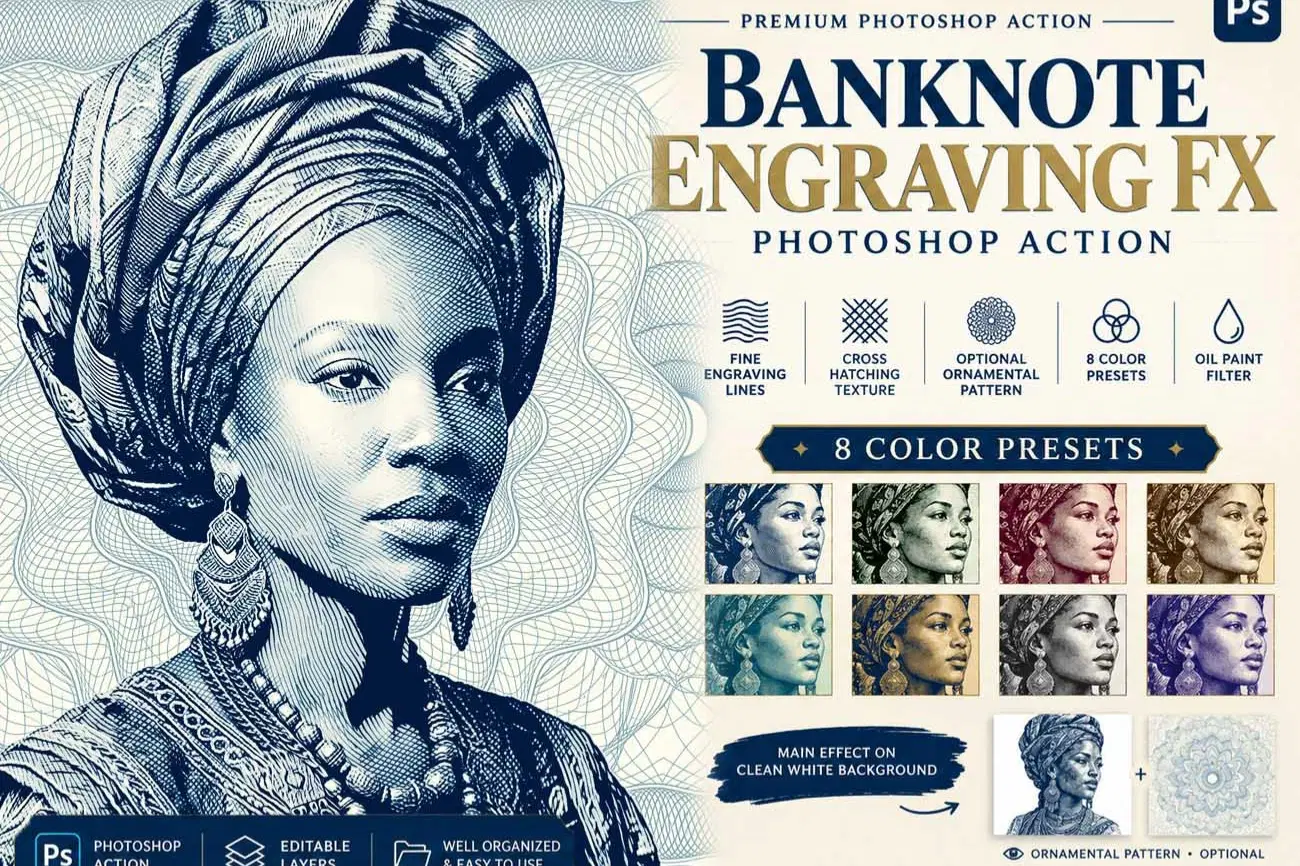
Transform your portraits into intricate banknote-inspired engraving artwork with Banknote Engraving FX, a creative Photoshop Action featuring detailed engraved linework, cross-hatching textures, stylized tonal processing, and eight artistic color presets.
Create a classic engraved portrait on a clean white background or customize your composition with optional ornamental and guilloché-inspired patterns.
KEY FEATURES
- Banknote-Inspired Engraving Effect: Create a distinctive engraved appearance with detailed linework and cross-hatching-inspired textures.
- Clean White Background: The main design is presented on a solid white background for a clean, versatile finish.
- Optional Ornamental Patterns: Decorative pattern elements are organized separately so you can enable or disable them using the layer visibility controls.
- 8 Color Presets: Explore eight artistic color variations to customize your final artwork.
- Oil Paint Filter-Based Styling: Adds stylized texture and tonal character to the portrait effect.
- Flexible Layer Organization: Keep the clean portrait look or enable optional decorative elements to create a more elaborate composition.
OPTIONAL ORNAMENTAL BACKGROUND
The ornamental pattern is not required for the main effect. It is provided as an optional design element in a separate folder.
Keep the folder hidden for a clean engraved portrait on a solid white background, or turn on its visibility to incorporate decorative guilloché-inspired details into your artwork.
IDEAL FOR
- Banknote-inspired portrait illustrations
- Vintage engraving artwork
- Artistic portrait prints
- Editorial and poster design
- Decorative digital illustrations
- Creative portfolios and graphic design projects
HOW TO USE
1. Open a suitable portrait in Adobe Photoshop.
2. Follow the included instructions to prepare your image.
3. Run the Banknote Engraving FX Photoshop Action.
4. Choose one of the eight available color presets.
5. Keep the ornamental pattern folder hidden for the clean white-background look, or enable it for an optional decorative finish.
Most important instruction:
First open an image in Photoshop. Now you need resize your image. For resize image select crop tools and go top menu
bar you see W x H x Reso three blank boxes. Write W 3000px, H 2000px, Resolution 72. Then press enter button.
**This action has been tested and working on Photoshop CC2022 English Version.
Software supported version: CC,CC2014,CC2015,CC2015.5,CC2016,CC2017,CC2018,CC2019,CC2020,CC2021,CCC2022+ English Version.**
Please watch video guide line here:https://youtu.be/j9v_T9HVhjo
File Includes:
- ATN File included (Photoshop Action File)
- Use Oil Filter
- Pattern File
- PDF Help File
- Help File
- Video guide link in the help file
- High quality result.
- Easy Customizable
- Organize layers
- Easy Install
- Easy to Use
- No photoshop skill needed
If you need any cooperation using the file please feel free to contact me:
"The model images and photographs are for presentation purposes and not included for sale"
Banknote Engraving, Banknote Engraving FX, Engraving Photoshop Action, Engraved Portrait, Photoshop Action, Vintage Engraving, Portrait Engraving,Cross Hatching Effect, Oil Paint Photoshop Action, White Background Portrait, Guilloche Pattern, Ornamental Pattern, Vintage Portrait Effect, Fine Line Engraving, Portrait Illustration, 8 Color Presets, Artistic Photo Effect
#BanknoteEngraving #PhotoshopAction #EngravingEffect #PortraitEngraving #VintageEngraving #CrossHatching #OilPaintEffect #GuillochePattern #EngravedPortrait #PhotoshopEffects #ColorPresets #DigitalArt #PortraitIllustration
Shop confidently with Shuppi
If your download isn’t what was promised, we’ll make it right. Eligible purchases can be refunded within fourteen calendar days when listings mislead, files fail, or duplicate checkouts happen.
- Listings must match what you receive—no surprises.
- Corrupted files or technical issues? Request a quick fix or refund.
- Duplicate purchases are covered without the hassle.
Product Specs
Tags
Frequently Asked Questions
You May Also Like

SCRATCHBOARD INK ENGRAVING FX — Photoshop Action
 studio retouch
Steel Plate Portrait FX Photoshop Action
studio retouch
Guilloche Currency Engraver FX Photoshop Action
studio retouch
Woodcut Engraving Shadow Reactor FX Photoshop Action
studio retouch
RGB Prism Explosion FX — Photoshop Action
studio retouch
Vintage Cross Hatch Etching Photoshop Action
studio retouch