











Personal use only
About
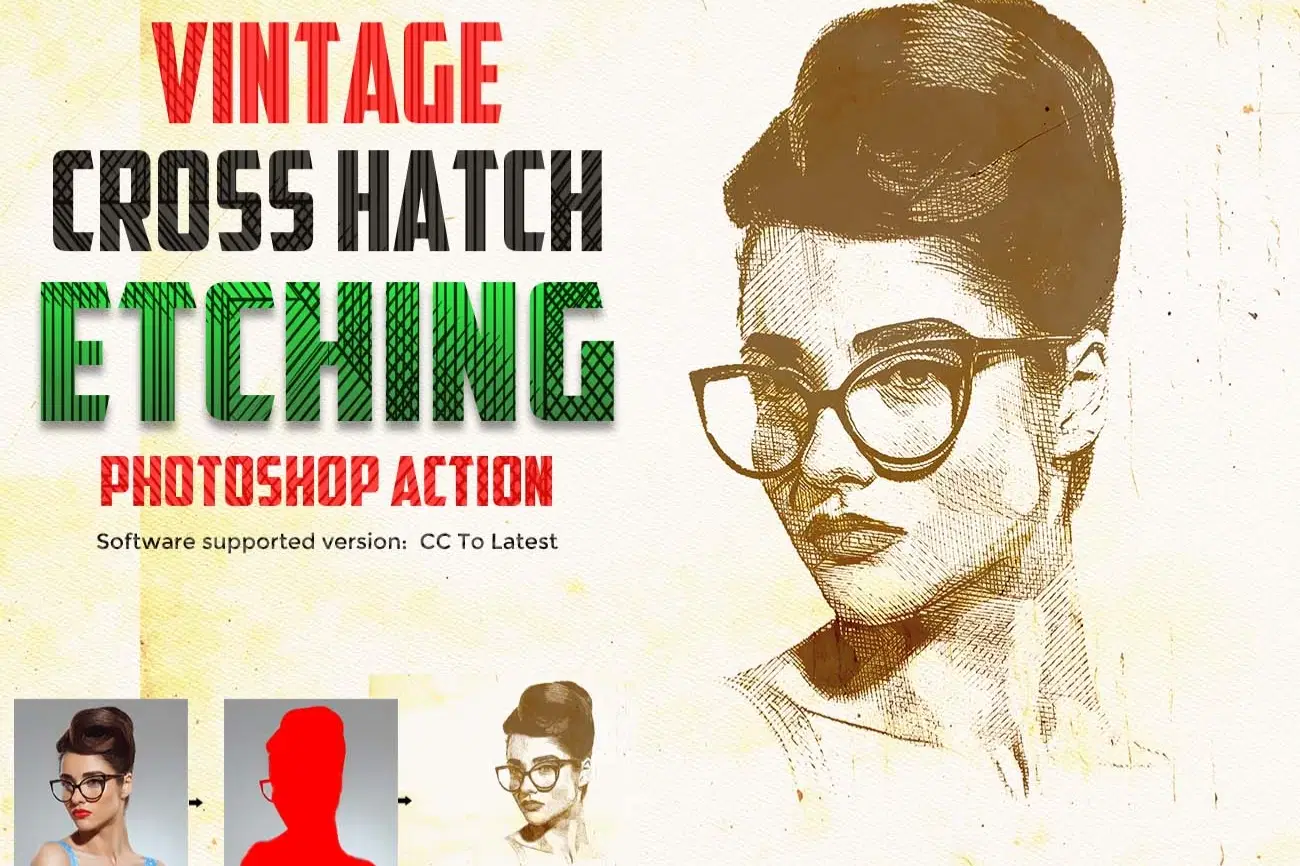
Vintage Cross Hatch Etching Photoshop Action
Create authentic vintage engraving artwork instantly with the Vintage Cross Hatch Etching Photoshop Action. This professional Photoshop action transforms your photos into detailed hand-drawn cross hatch etching illustrations inspired by classic ink engraving, old currency prints, antique book illustrations, woodcut art, and vintage pen & ink sketches.
Designed with realistic etched lines, fine hatch shading, distressed paper texture, and vintage print aesthetics, this action is perfect for portraits, posters, album covers, editorial artwork, tattoo designs, branding projects, whiskey labels, streetwear graphics, and retro illustration effects.
The action uses a fully editable smart object workflow, allowing you to customize hatch intensity, ink texture, contrast, grain, and vintage tones with ease. Achieve professional engraving-style artwork in just one click.
This action has been tested and working on Photoshop CC2022 English Version.
Software supported version: CC,CC2014,CC2015,CC2015.5,CC2016,CC2017,CC2018,CC2019,CC2020,CC2021,CCC2022+ English Version.
Please watch video guide line here:https://youtu.be/-zLpX4R-DoA
Most important instruction:
(1) First open an image in Photoshop. Now you need resize your image. For resize image select crop tools and go top menu
bar you see W x H x Reso three blank boxes. Write W 3000px, H 2000px, Resolution 72. Then press enter button.
(2) Open your photo Create a new layer then rename “paint” (in lowercase). Then select a soft brush and paint your subject focus area then click action play button.
Features
- One Click Photoshop Action
- Vintage Cross Hatch Effect
- Realistic Etching Illustration Style
- Engraving Lines
- High Resolution Output
- Non-Destructive Workflow
- Vintage Paper Texture
- Organized Layers & Folders
- Professional Retro Print Look
Perfect For
- Portrait Photography
- Vintage Posters
- Album Covers
- Editorial Artwork
- Tattoo Designs
- Luxury Branding
- Retro Print Graphics
- Streetwear Design
- Antique Illustration Effects
File Includes:
- ATN File included (Photoshop Action File)
- Use Oil Filter
- Pattern File
- Help File
- PDF Help File
- Video guide link in the help file
- High quality result.
- Easy Customizable
- Organize layers
- Easy Install
- Easy to Use
- No photoshop skill needed
If you need any cooperation using the file please feel free to contact me:
"The model images and photographs are for presentation purposes and not included for sale"
vintage ,cross hatch ,etching photoshop action, engraving photoshop action, etching portrait photoshop action, cross hatch photoshop action, vintage engraving effect, hand drawn etching photoshop action, ink engraving effect photoshop, vintage illustration photoshop action, woodcut effect photoshop action, scratchboard photoshop action, retro engraving effect, vintage ink portrait effect, banknote engraving photoshop action, engraved portrait photoshop action, pen and ink effect photoshop, cross hatch drawing photoshop action, etched illustration effect, antique engraving photoshop action, vintage sketch effect photoshop, retro line art photoshop action, hatch shading effect photoshop, engraved line art effect, vintage print illustration photoshop action, old paper engraving effect, detailed engraving photoshop action
#PhotoshopAction, #EngravingEffect, #EtchingArt, #CrossHatch, #VintageIllustration, #InkDrawing, #LineArt, #RetroDesign, #WoodcutEffect, #EtchingPortrait, #VintageArt, #GraphicDesign, #DigitalArt, #PosterDesign, #VintagePrint, #PhotoshopFX, #IllustrationEffect, #SketchEffect, #TattooDesign, #StreetwearDesign, #AlbumCoverArt, #PenAndInk, #EngravingArt, #DesignAssets
Shop confidently with Shuppi
If your download isn’t what was promised, we’ll make it right. Eligible purchases can be refunded within fourteen calendar days when listings mislead, files fail, or duplicate checkouts happen.
- Listings must match what you receive—no surprises.
- Corrupted files or technical issues? Request a quick fix or refund.
- Duplicate purchases are covered without the hassle.
Product Specs
Tags
Frequently Asked Questions
You May Also Like

Cross Hatch Collection Photoshop Actions
 studio retouch
Steel Plate Portrait FX Photoshop Action
studio retouch
SCRATCHBOARD INK ENGRAVING FX — Photoshop Action
studio retouch
Guilloche Currency Engraver FX Photoshop Action
studio retouch
Ink & Woodcut Collection Photoshop Actions
studio retouch
Woodcut Engraving Shadow Reactor FX Photoshop Action
studio retouch