











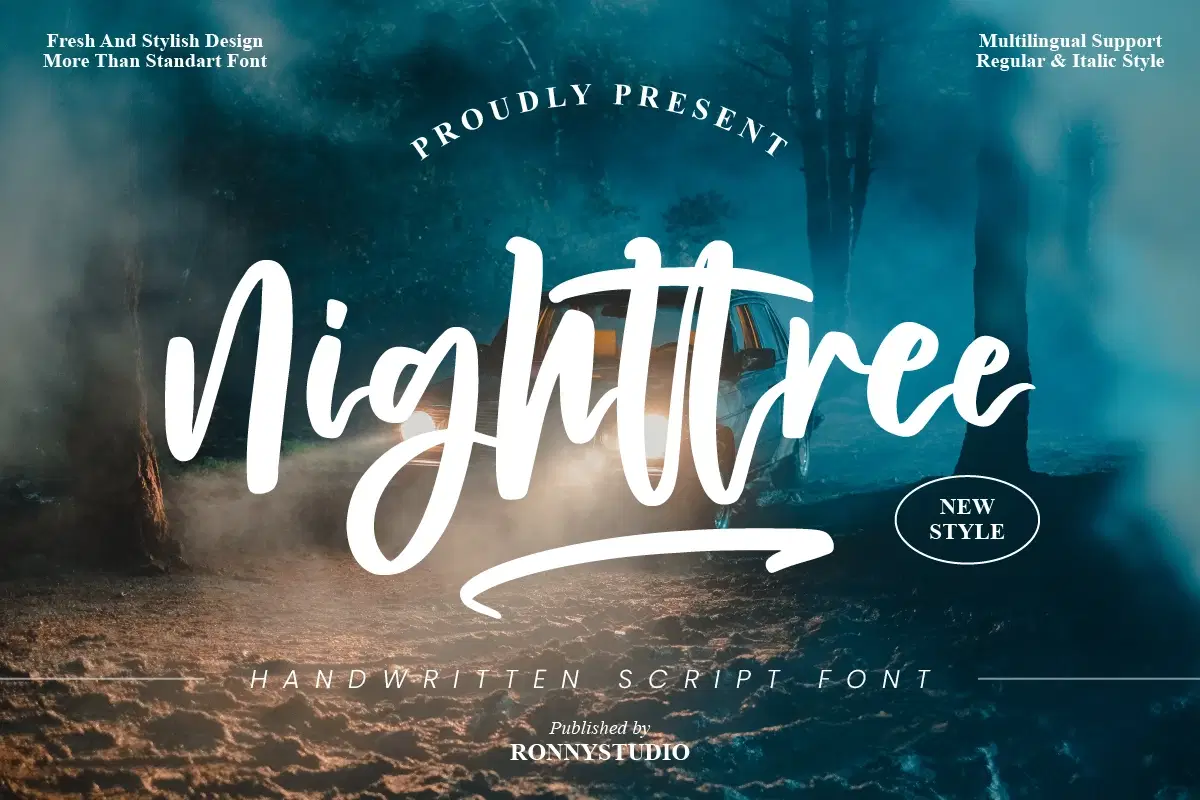
For personal, non-commercial projects only (portfolios, personal blogs, hobby projects).
About
Nighttree is a lovely script font featuring charming, playful characters that seem to dance along the baseline. It is PUA encoded which means you can access all glyphs and swashes with ease! This font is perfect for branding, business cards, Christmas cards, Social Media Posts, logos, product packaging, wedding invitations, quotes, decorations, t-shirts, poster labels etc.
What’s included?
Uppercase & Lowercase
Number & Punctuation
Ligature & swash
Multilingual Support
Format File : TTF & OTF
Works on PC & Mac
2 Style font :
Regular
italic
Note of the author :
By installing or using this font, you are agree to the Product Usage Agreement:
Please contact us if you have any questions. Enjoy Crafting and thanks for supporting us! 
Enjoy!
Shop confidently with Shuppi
If your download isn’t what was promised, we’ll make it right. Eligible purchases can be refunded within fourteen calendar days when listings mislead, files fail, or duplicate checkouts happen.
- Listings must match what you receive—no surprises.
- Corrupted files or technical issues? Request a quick fix or refund.
- Duplicate purchases are covered without the hassle.
Product Specs
Tags
Frequently Asked Questions
You May Also Like

TeeHand Upppercase Font
 akropol
Secy Break – Streetwear Fancy Display Font
 Black Junst
Winter Belle - Handwritten Modern Script Font
 Sakti Avellin
Delightul – Elegant Script Font
 Masyafi Studio
10,000 Font Mega Pack Bundle: Versatile Fonts for Designers (Digital Download)
 DiverseMediaShop
Magic Bubble - Cute Handwritten Font Duo
Sakti Avellin