







For personal, non-commercial projects only (portfolios, personal blogs, hobby projects).
About
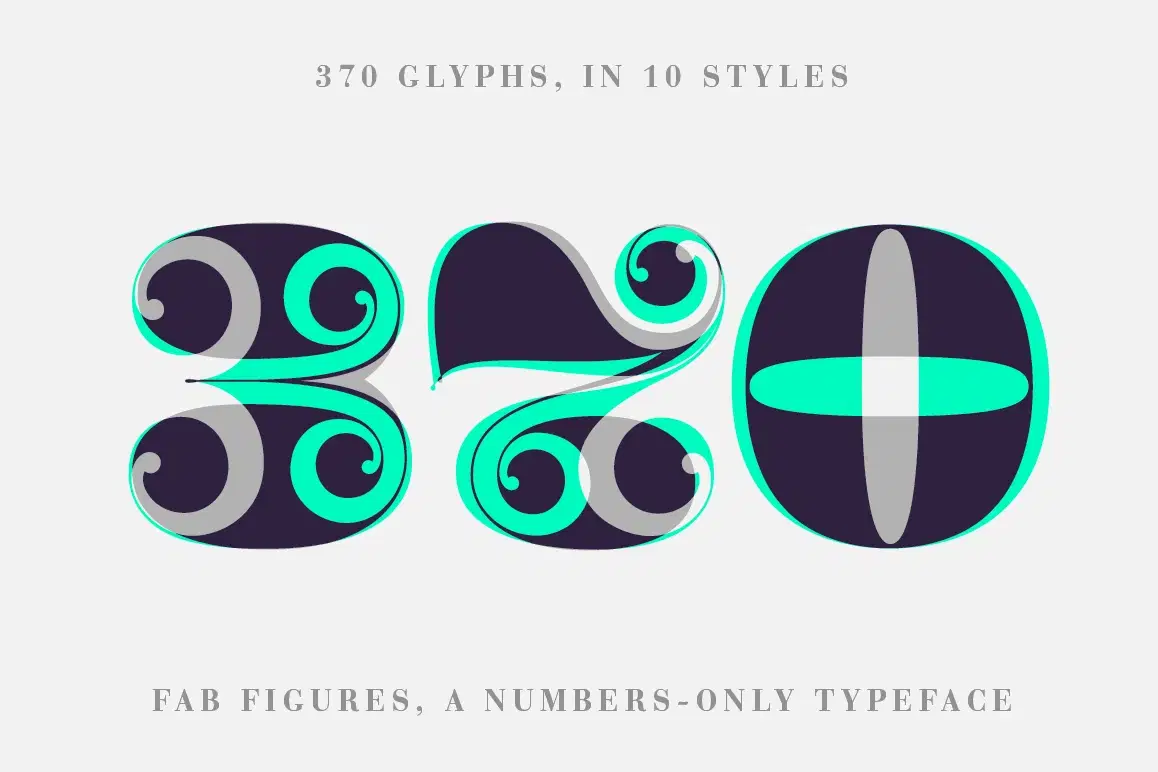
Fab Figures is a numbers-only font. It is a high contrast display font family with curly terminals. The entire font family consists of 10 styles: 2 styles for big usage, 2 styles for normal usage, 2 styles for small usage and 4 patterned styles (fitting to the Big styles). Check our PDF-FILE: http://letterwerk.ch/wp-content/uploads/2016/12/Fab-Figures-Typeface.pdf
Character Set: 1 2 3 4 5 6 7 8 9 0 | % # • ~ { $ £ € } . , : ; + - = ÷ / ° * ' ’ (Arrows) (No-Symbol) (Nr-Symbol)
Files included (TrueType):
Fab-Figures Big A.ttf
Fab-Figures Big B.ttf
Fab-Figures Big C.ttf
Fab-Figures Big D.ttf
Fab-Figures Big E.ttf
Fab-Figures Big F.ttf
Fab-Figures Normal A.ttf
Fab-Figures Normal D.ttf
Fab-Figures Small A.ttf
Fab-Figures Small D.ttf
Shop confidently with Shuppi
If your download isn’t what was promised, we’ll make it right. Eligible purchases can be refunded within fourteen calendar days when listings mislead, files fail, or duplicate checkouts happen.
- Listings must match what you receive—no surprises.
- Corrupted files or technical issues? Request a quick fix or refund.
- Duplicate purchases are covered without the hassle.
Product Specs
Tags
Frequently Asked Questions
You May Also Like

Vision Board & Goal Setting Hub - Notion Template for Vision Board, Affirmations and Goal Planning
 Plan it. Do it. Love it.
Black Grid Fabric Texture

Dreadglyph Typeface
 Nouric Design
Wibby Handwriting Typeface
Nouric Design
Warm Linen Fabric Texture
