











Personal use only
About
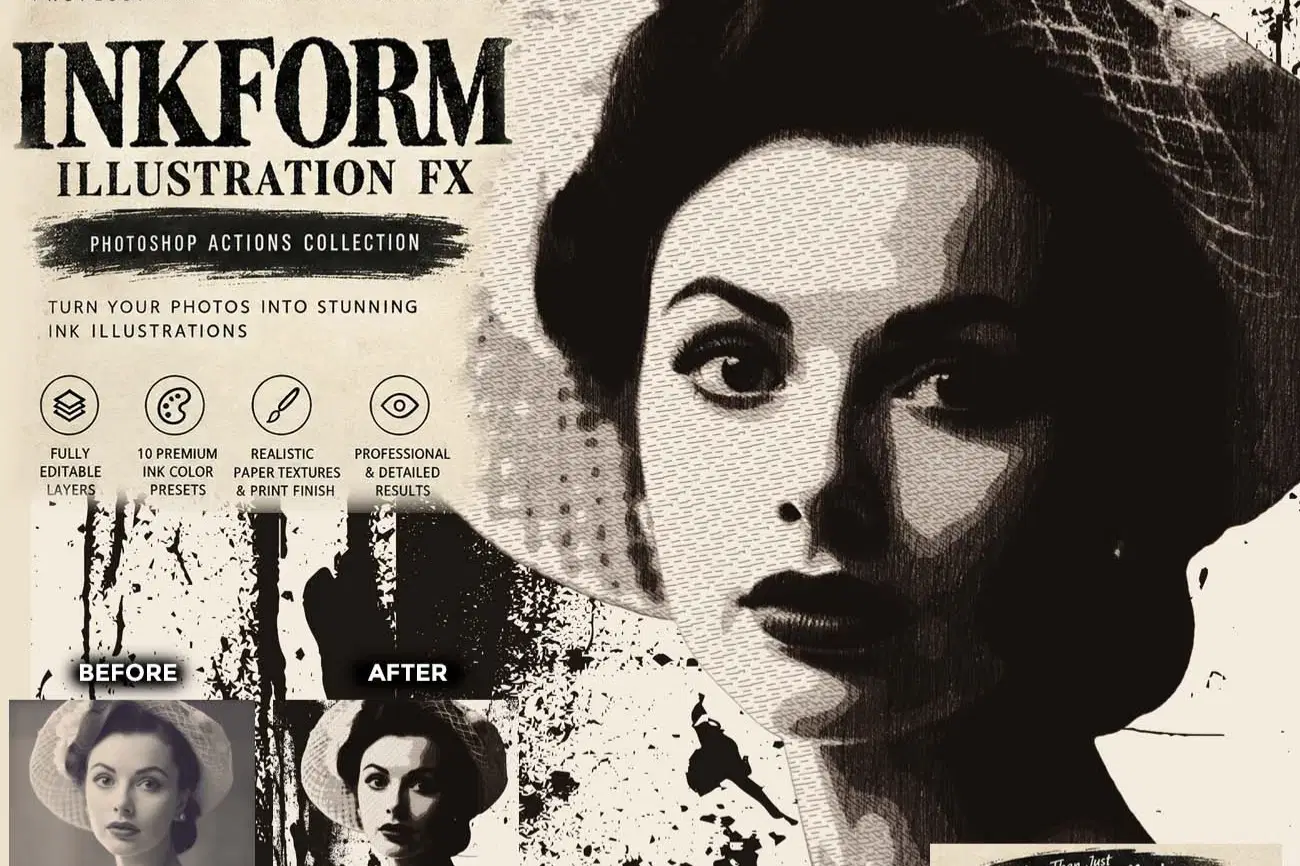
INKFORM ILLUSTRATION FX Photoshop Action
Transform your photos into professional hand-crafted ink illustrations with INKFORM ILLUSTRATION FX Photoshop Action. Designed for artists, photographers, designers, illustrators, and creative professionals who want a realistic editorial ink drawing effect without losing important facial and subject details.
This advanced Photoshop Action combines expressive ink contours, variable line weight, directional ink strokes, cross-hatching, fine hatching, facial ink details, hair detail, broken ink imperfections, subtle ink wash, highlight cuts, paper fibers, paper grain, and realistic ink transfer effects to create a distinctive traditional ink illustration appearance.
Unlike simple sketch or vector effects, INKFORM ILLUSTRATION FX is built as a layer-based editable illustration workflow, giving you control over the major ink, texture, paper, and finishing elements.
KEY FEATURES
• Professional hand-drawn ink illustration effect
• Directional ink stroke texture
• Traditional cross-hatching effect
• Natural broken-ink imperfections
• Controlled ink scratch texture
• 10 Premium Ink Color Presets
• Fully layer-based and editable workflow
• Non-destructive color and finishing controls
• Professional editorial and print-inspired appearance
• Suitable for both portrait and landscape images
SUBJECT MASK STOP MESSAGE
The action includes a STOP MESSAGE for subject mask refinement.
After automatic subject selection, the action pauses so you can refine the Layer Mask manually when necessary. This is especially useful for: Carefully refining the subject mask before continuing helps produce cleaner and more reliable results across different photographs.
For the strongest results, use images with clear subjects, good tonal contrast, visible details, and reasonably clean compositions.
The effect is organized into clearly named layers and groups, allowing you to adjust individual components such as:
Perfect for:
Ink Portraits, Editorial Artwork, Fashion Illustration, Character Art, Book Covers, Posters, Album Artwork, Concept Art, Creative Photography, Print Design, Artistic Portraits, Illustration Projects, and Digital Art.
This action has been tested and working on Photoshop CC2022 English Version.
Software supported version: CC,CC2014,CC2015,CC2015.5,CC2016,CC2017,CC2018,CC2019,CC2020,CC2021,CCC2022+ English Version.
Please watch video guide line here:https://youtu.be/LSbMgzBf3M0
File Includes:
- ATN File included (Photoshop Action File)
- Pattern File
- PDF Help File
- Help File
- Video guide link in the help file
- High quality result.
- Easy Customizable
- Organize layers
- Easy Install
- Easy to Use
- No photoshop skill needed
If you need any cooperation using the file please feel free to contact me:
"The model images and photographs are for presentation purposes and not included for sale"
ink illustration photoshop action, ink art photoshop action, ink drawing photoshop action, ink portrait photoshop action, hand drawn ink effect, realistic ink effect, ink sketch action, professional ink effect, illustration photoshop action, editorial ink effect, artistic photoshop action, cross hatching photoshop action, fine hatching effect, ink contour effect, ink line art action, ink engraving effect, traditional ink illustration, ink wash photoshop action, paper texture photoshop action, ink print effect, ink transfer effect, vintage ink effect, black ink effect, portrait illustration action, landscape illustration action, fashion illustration photoshop action, character illustration action, digital ink artwork, hand drawn illustration effect, professional photoshop action
#InkIllustration, #InkArt, #InkDrawing, #InkPortrait, #PhotoshopAction, #PhotoshopActions, #InkEffect, #InkSketch, #IllustrationEffect, #DigitalIllustration, #InkArtEffect, #CrossHatching, #FineHatching, #LineArt, #InkContour, #InkWash, #PaperTexture, #InkTransfer, #EditorialArt, #PortraitIllustration, #ArtisticPhotography, #DigitalArt, #CreativePhotoshop, #GraphicDesign, #IllustrationArt, #HandDrawnEffect, #VintageInk, #PrintEffect, #ConceptArt, #ProfessionalPhotoshop
Shop confidently with Shuppi
If your download isn’t what was promised, we’ll make it right. Eligible purchases can be refunded within fourteen calendar days when listings mislead, files fail, or duplicate checkouts happen.
- Listings must match what you receive—no surprises.
- Corrupted files or technical issues? Request a quick fix or refund.
- Duplicate purchases are covered without the hassle.
Product Specs
Tags
Frequently Asked Questions
You May Also Like

Vector Ink Sketch FX Photoshop Action
 studio retouch
Stipple Collection Photoshop Actions
studio retouch
Illustrations of Fruits and Berries
 AI Crafted Magnolia
Peony - watercolor illustrations
AI Crafted Magnolia
Stipple Ink Artist FX Photoshop Action
studio retouch
Magnolia - botanical illustrations
AI Crafted Magnolia