












Personal use only
About
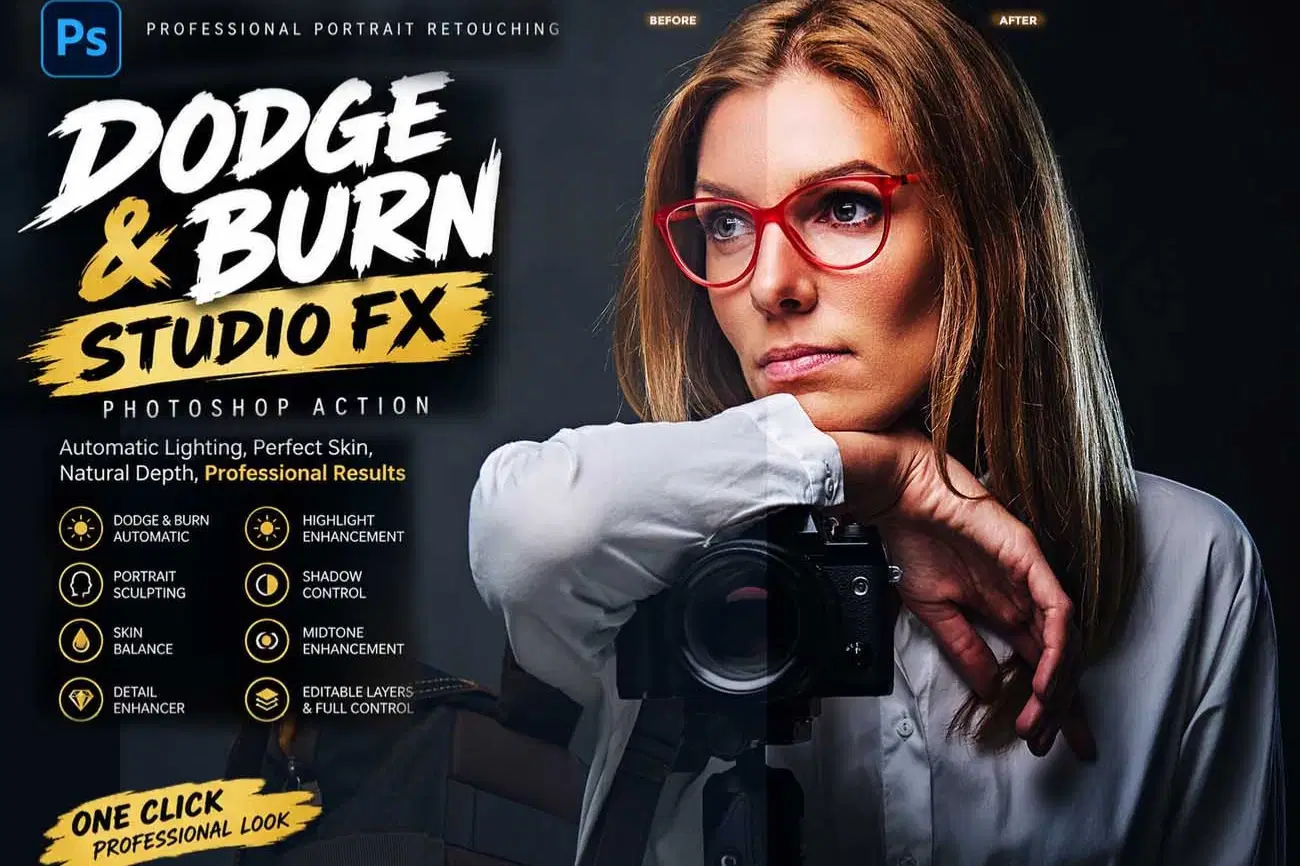
DODGE & BURN STUDIO FX Photoshop Action
Transform ordinary portraits into polished, dimensional images with DODGE & BURN STUDIO FX Photoshop Action. Designed for professional portrait retouching, this automated workflow enhances highlights, shadows, midtones, facial dimension, skin balance, contrast, and fine details without requiring manual brush painting.
The action creates an organized, editable layer structure with dedicated controls for Dodge, Burn, Portrait Sculpt, Detail Enhancement, Skin Balance, and Final Adjustments. Easily fine-tune the intensity by adjusting layer opacity, visibility, and individual effect groups.
Perfect for portrait photographers, beauty retouches, fashion photographers, studio photographers, creative professionals, and designers who want a faster and more controlled portrait enhancement workflow.
Create refined lighting, stronger facial definition, balanced skin tones, enhanced details, and professional-looking portrait depth with a streamlined Photoshop retouching system.
Features:
Automatic Dodge & Burn Workflow, Highlight Enhancement, Midtone Enhancement, Shadow Control, Portrait Sculpting, Skin Balance, Detail Enhancement, Editable Layers, Non-Destructive Workflow, Adjustable Effect Strength, Before & After Comparison, Professional Portrait Retouching.
Most important instruction:
First open an image in Photoshop. Now you need resize your image. For resize image select crop tools and go top menu
bar you see W x H x Reso three blank boxes. Write W 3000px, H 2000px, Resolution 72. Then press enter button.
This action has been tested and working on Photoshop CC2022 English Version.
Software supported version: CC,CC2014,CC2015,CC2015.5,CC2016,CC2017,CC2018,CC2019,CC2020,CC2021,CCC2022+ English Version.
Please watch video guide line here:https://youtu.be/YYaA-fViZWQ
File Includes:
- ATN File included (Photoshop Action File)
- Help File
- Video guide link in the help file
- High quality result.
- Easy Customizable
- Organize layers
- Easy Install
- Easy to Use
- No photoshop skill needed
If you need any cooperation using the file please feel free to contact me:
"The model images and photographs are for presentation purposes and not included for sale"
dodge and burn photoshop action, dodge burn action, dodge burn photoshop, portrait retouching action, portrait photoshop action, professional retouching action, skin retouching photoshop, beauty retouching action, portrait enhancement, portrait lighting photoshop, skin balance photoshop, portrait sculpting, facial sculpting photoshop, automatic dodge burn, automated portrait retouching, professional portrait action, beauty portrait action, fashion retouching, studio portrait action, photo retouching action, skin enhancement photoshop, facial lighting, portrait lighting effect, professional photoshop action, editable photoshop action, non destructive retouching, high end retouching, beauty photography action, photographer photoshop action, professional photo editing, portrait enhancement action
#DodgeAndBurn, #DodgeBurn, #PhotoshopAction, #PortraitRetouching, #PhotoRetouching, #PortraitEditing, #BeautyRetouching, #SkinRetouching, #PortraitEnhancement, #PortraitLighting, #PhotoshopRetouching, #BeautyPhotography, #FashionRetouching, #StudioPortrait, #ProfessionalRetouching, #PhotoEditing, #PortraitPhotography, #PhotoshopEffects, #RetouchingAction, #DigitalRetouching, #SkinEnhancement, #PortraitSculpting, #PhotographyTools, #CreativeRetouching, #AdobePhotoshop
Shop confidently with Shuppi
If your download isn’t what was promised, we’ll make it right. Eligible purchases can be refunded within fourteen calendar days when listings mislead, files fail, or duplicate checkouts happen.
- Listings must match what you receive—no surprises.
- Corrupted files or technical issues? Request a quick fix or refund.
- Duplicate purchases are covered without the hassle.
Product Specs
Tags
Frequently Asked Questions
You May Also Like

RGB Prism Explosion FX — Photoshop Action
 studio retouch
VECTOR POSTER POP FX Photoshop Action
studio retouch
RGB Echo Chamber FX Photoshop Action
studio retouch
Ink Silhouette Poster Creator Photoshop Action
studio retouch
Triple Halftone Stamp Art Photoshop Action
studio retouch
RGB Portrait Fracture FX Photoshop Action
studio retouch