
















For personal, non-commercial projects only (portfolios, personal blogs, hobby projects).
About
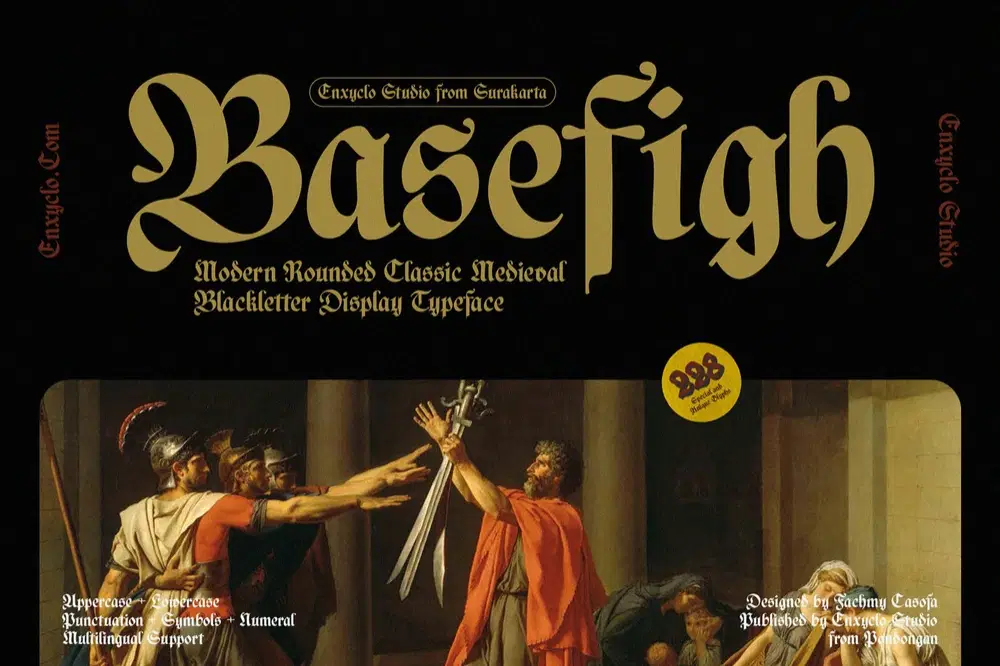
NCL Basefigh is a medieval rounded blackletter font. The letters are inspired from the middle ages with a blackletter style but have rounded corners which are unique and modern. Very suitable for creative projects that have a medieval theme or contemporary designs but have a classic touch. Its modern aesthetics bring a whole new dimension to your designs, making them stand out. Whether you’re working on a website, poster, logo, or any other project, this font adds that extra touch of innovation and sophistication.
True Type Font (TTF)
Open Type Font (OTF)
Web Open Font Format (WOFF1 & WOFF2)
228 Total Glyphs
Uppercase & Lowercase
Numeral, Punctuation & Symbols
Multilingual Support
Shop confidently with Shuppi
If your download isn’t what was promised, we’ll make it right. Eligible purchases can be refunded within fourteen calendar days when listings mislead, files fail, or duplicate checkouts happen.
- Listings must match what you receive—no surprises.
- Corrupted files or technical issues? Request a quick fix or refund.
- Duplicate purchases are covered without the hassle.
Product Specs
Tags
Frequently Asked Questions
You May Also Like

TeeHand Upppercase Font
 akropol
Secy Break – Streetwear Fancy Display Font
 Black Junst
10,000 Font Mega Pack Bundle: Versatile Fonts for Designers (Digital Download)
 DiverseMediaShop
ENIGMATIC WAESBENDIY — Blackletter Font
 Enxyclo
BAGESHRON — Blackletter Font Family
Enxyclo
Ghostes Season - Handwritten Font Trio
 Sakti Avellin